
English · 简体中文





Composable, view-based context for DeepSeek Harness.
Pluggable sources and strategies, with layered memory and self-evolving skills out of the box.
Install and start · Watch the demo · Documentation · Build a plugin
An Agent that starts every session from scratch keeps asking what it was already told. Putting everything into one memory store is no better: it either floods each turn or misses what matters. dsh-mnemon gives DeepSeek Harness memory that is layered, visible and composable, and skills that improve with use.
- The right memory for each turn. Preferences and working facts stay in context. Project documents and long-term evidence are searched only when a question needs them.
- You can see what a turn used. Under each reply, the turn memory bar lists the documents and memories the turn read and wrote, and one click opens each in the Memory System. The Memory System shows everything that is stored and lets you edit it.
- Save to memory in one click. When a conversation turns up a fact worth keeping, the brain mark under the reply hands it to a task Agent, which removes duplicates, distils it and writes it to the right Memory Space, or saves it where you choose: working memory, your profile or a Memory Space. The receipt says where it went.
- Skills that improve with use. Skills keeps every DSH skill in one place. It can review your real conversations, draft a better
SKILL.mdand backtest it before you adopt it, and it installs more skills from skills.sh, GitHub and sites that publish Agent Skills. - Compose it on the Plugins page. Choose a main strategy and optional enhancements, and switch them without moving any data. Every component has its own page for its settings.
- Keep data where you want it. Local by default with Mnemon Native, or one of eight third-party Providers. Storage can be global, per workspace, centralized or in a directory you choose, with ZIP backup.
- Extend it. Sources and Strategies are ordinary DSH plugins built on public SDKs. An installed component gets the same pages and switches as the shipped ones.
These recordings come from a real WebUI with the live DeepSeek model answering, on a seeded, fictional project, Lumen. Waits for the model play faster, marked in the lower right corner.
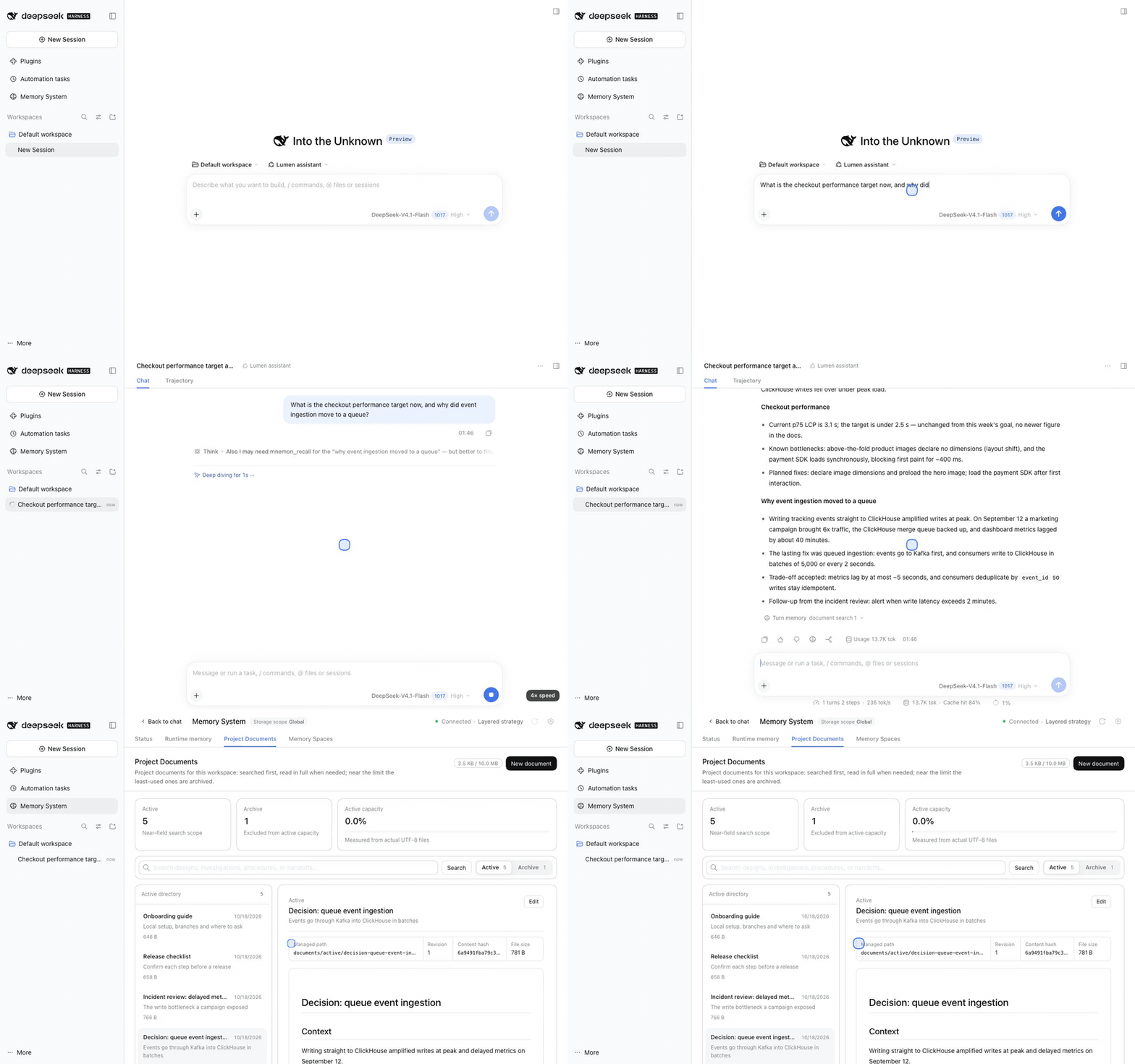
Save a new fact to memory. A reply reports a new measurement. Select the brain mark under it, cut the candidate down to the sentence worth keeping and send it to the task Agent; the receipt names the Memory Space it went to and opens it in one click.
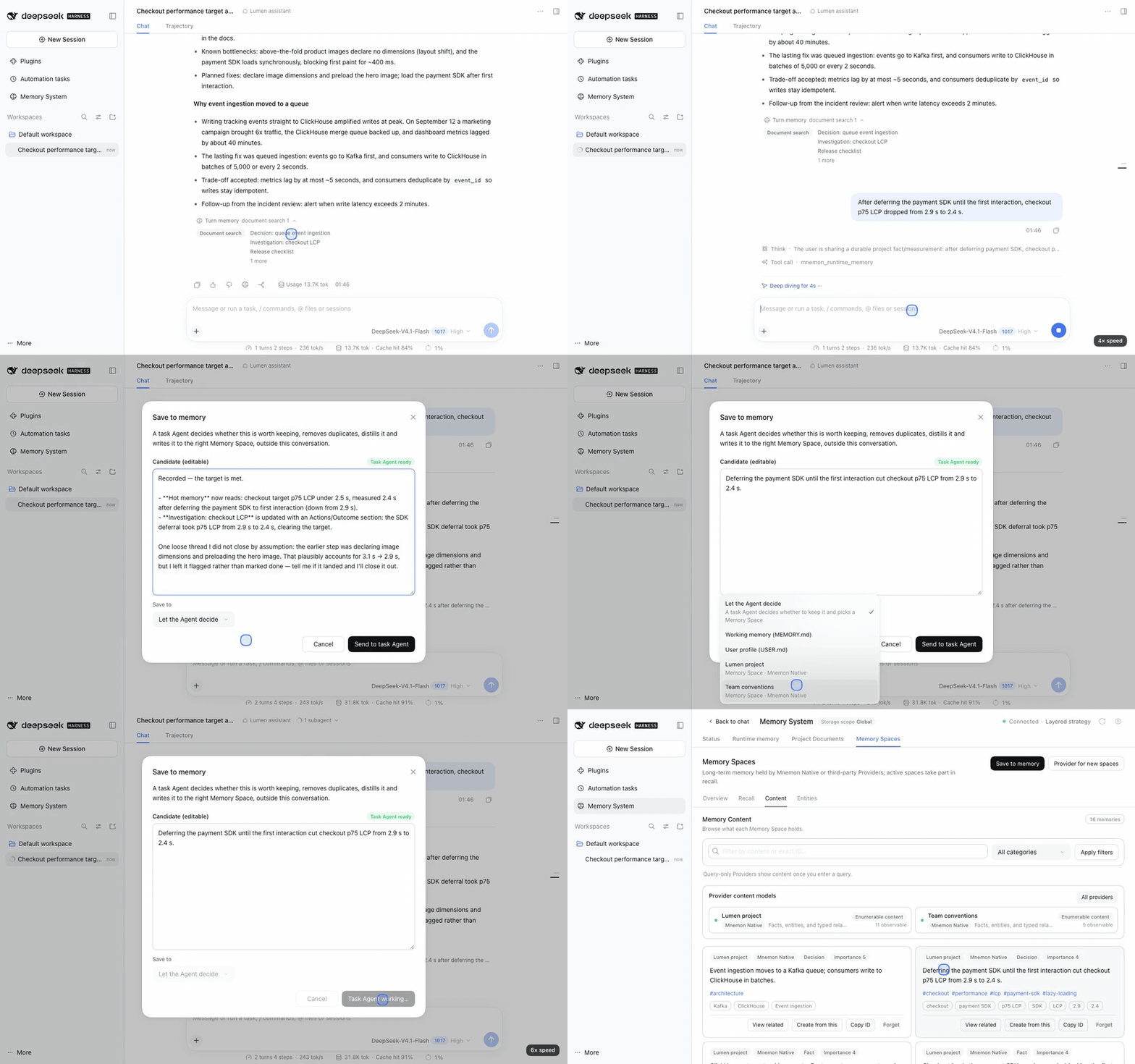
See all memory in one place. Status, runtime memory, Project Documents and Memory Spaces live in the Memory System. The graph links memories through the entities they mention, and Ask Agent answers with the memories it cites, by content.
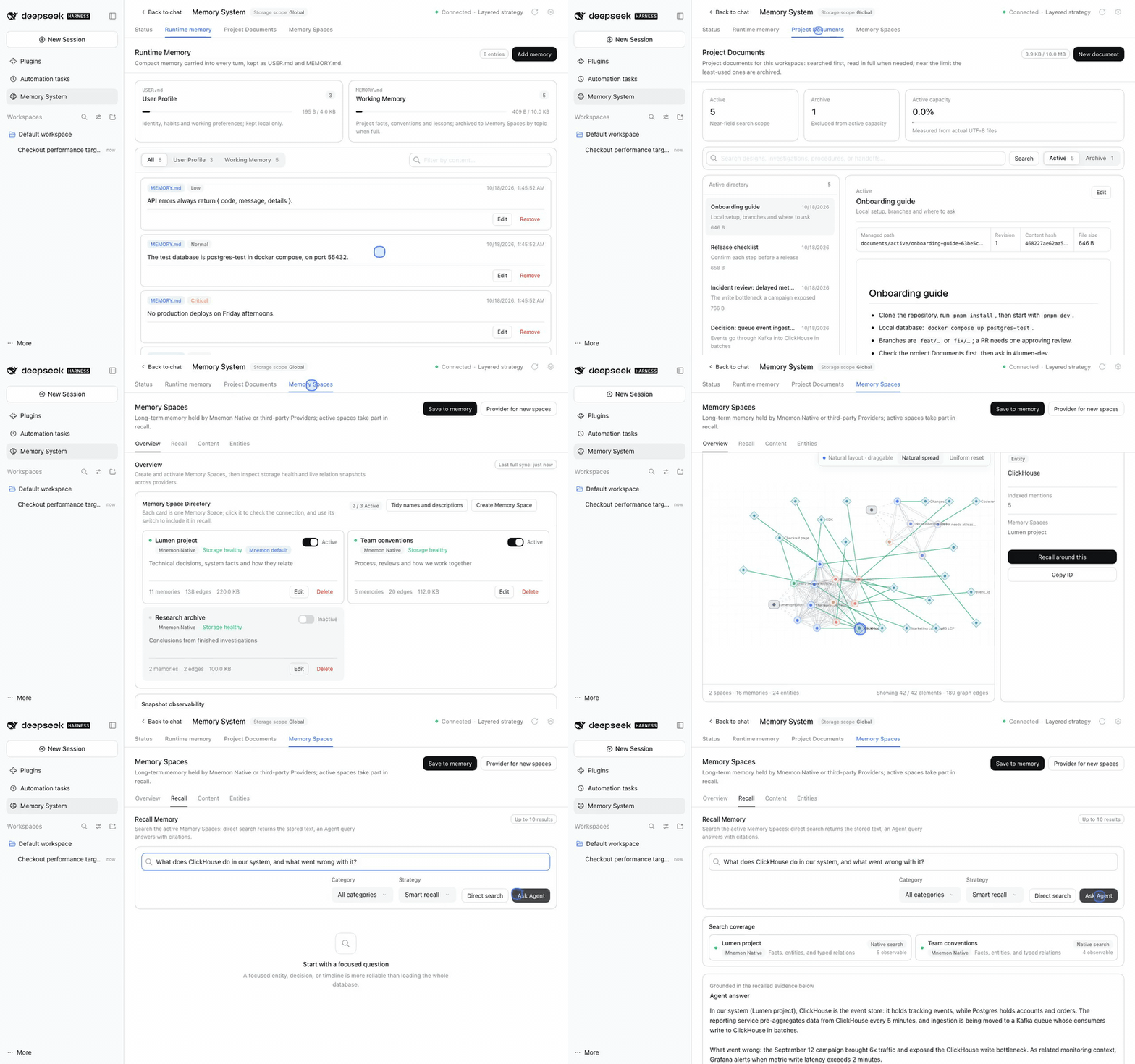
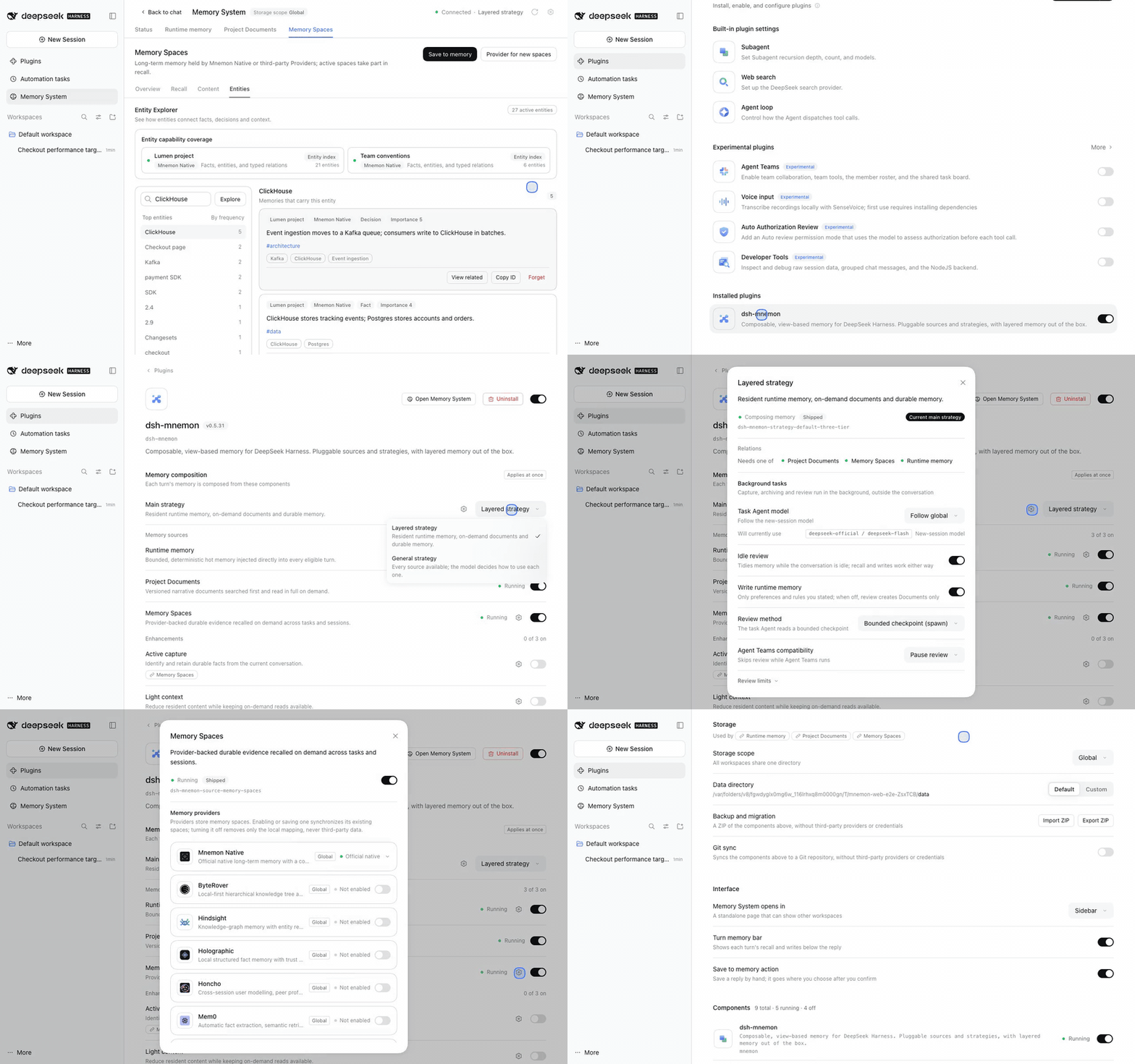
Compose memory on the Plugins page. One main strategy, its memory sources and optional enhancements, each switch applying at once. Every component has its own page, and storage, backup and interface settings live here too.
Every step is explained in the UI guide; all screens, recordings and the capture environment are in the v0.5.32 gallery.
| Memory | Keep here | How it reaches the Agent |
|---|---|---|
| Runtime memory | Preferences, working agreements, facts needed on the next turn | Injected every turn as compact USER.md and MEMORY.md |
| Project Documents | Designs, investigations, procedures and handoffs | Searched first, then read when relevant |
| Memory Spaces | Durable facts, decisions, entities and their relationships | Recalled on demand from the enabled Providers |
The default Layered strategy keeps runtime memory resident and reads the other two on demand. The General strategy offers every available source within one budget and lets the model decide how to use each. A memory space is one named, Provider-backed scope for long-term evidence; the Chinese product term is 记忆空间.
Skills is an experimental component for the SKILL.md skills DSH loads from your project and your home folder. Its page sits in the Memory System, or in the sidebar on its own.
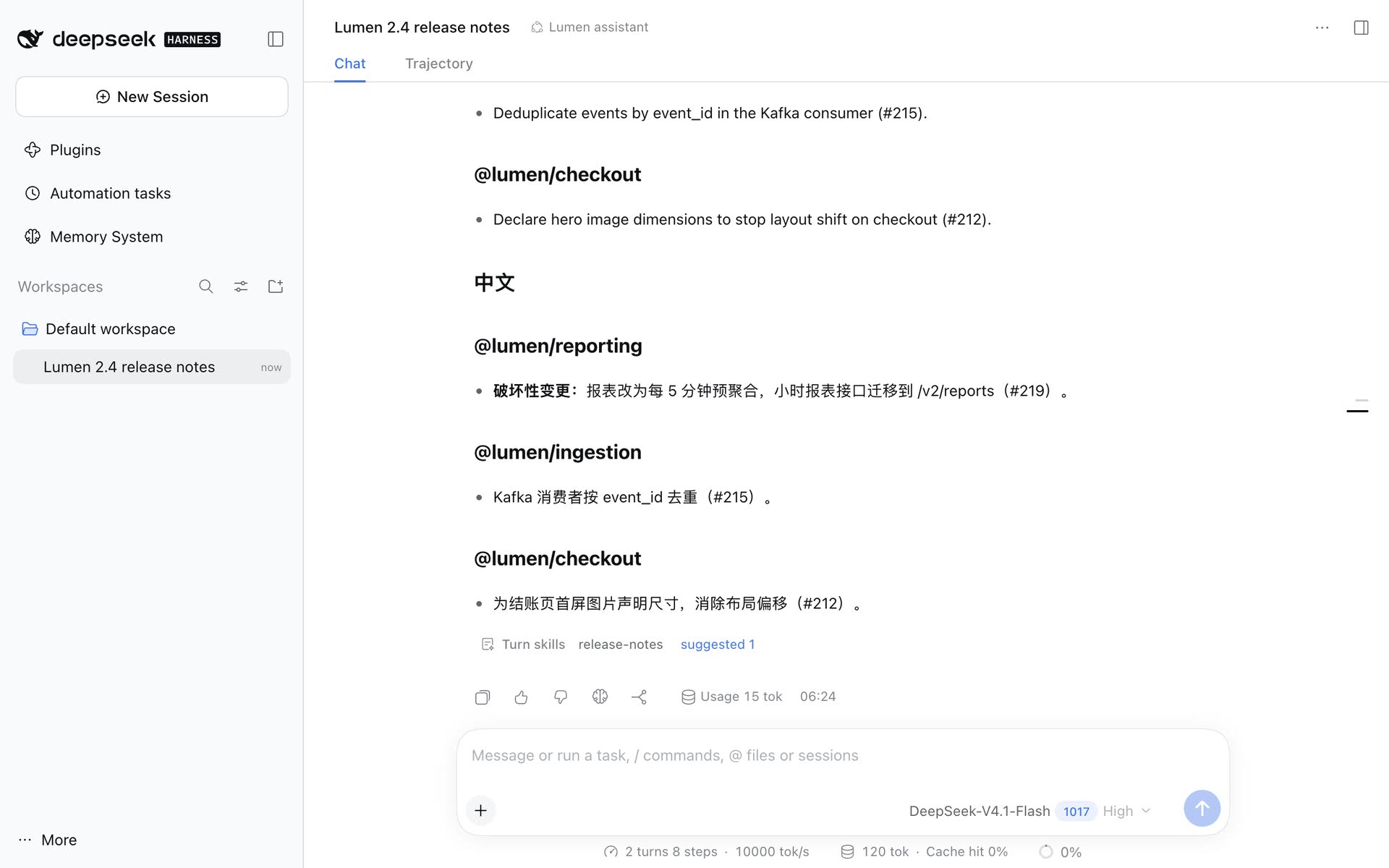
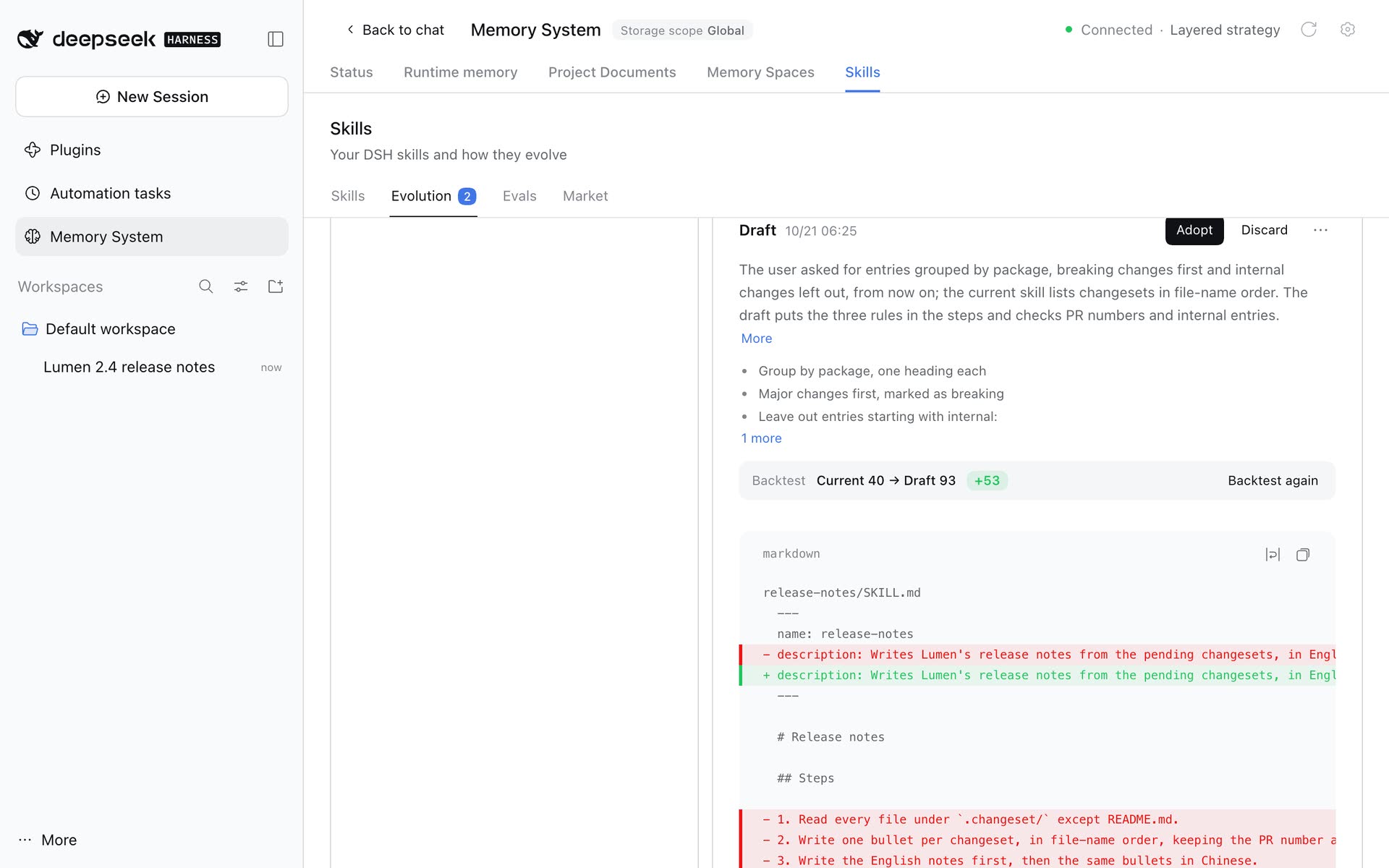
| A turn's review suggests an improvement | You adopt it after a backtest |
|---|---|
 |
 |
- Manage. Switch a skill off for the model or the
/menu, use it in the conversation in one click, edit it, and go back to any earlier version. - Evolve. With self-evolution on, finished conversations are reviewed in the background for corrections, "from now on" instructions, failed tools and reusable procedures. A suggestion cites the steps it rests on; a task Agent drafts the new
SKILL.md, which is backtested against the current version before you adopt it. Nothing changes without your Adopt. - Test. Each skill has its own cases, from reviews, from recorded conversations or written by hand, and a backtest scores any version on them.
- Install. The market searches skills.sh's open index and reads any GitHub repository, any site publishing an Agent Skills discovery index, and curated catalogs; every install is previewed, with security reviews where they exist.
- In the conversation. A line under each turn names the skills it used and what its review suggested, each one click from its page.
Self-evolution stays off until you turn it on under Plugins → dsh-mnemon → Skills. The Skills guide walks through every screen.
New to DSH? Install and start walks from an empty machine to your first memory, with a screenshot for every step. The short version, with Node.js 22.19 or later:
npm install --global pnpm
npx @deepseek-ai/dsh web
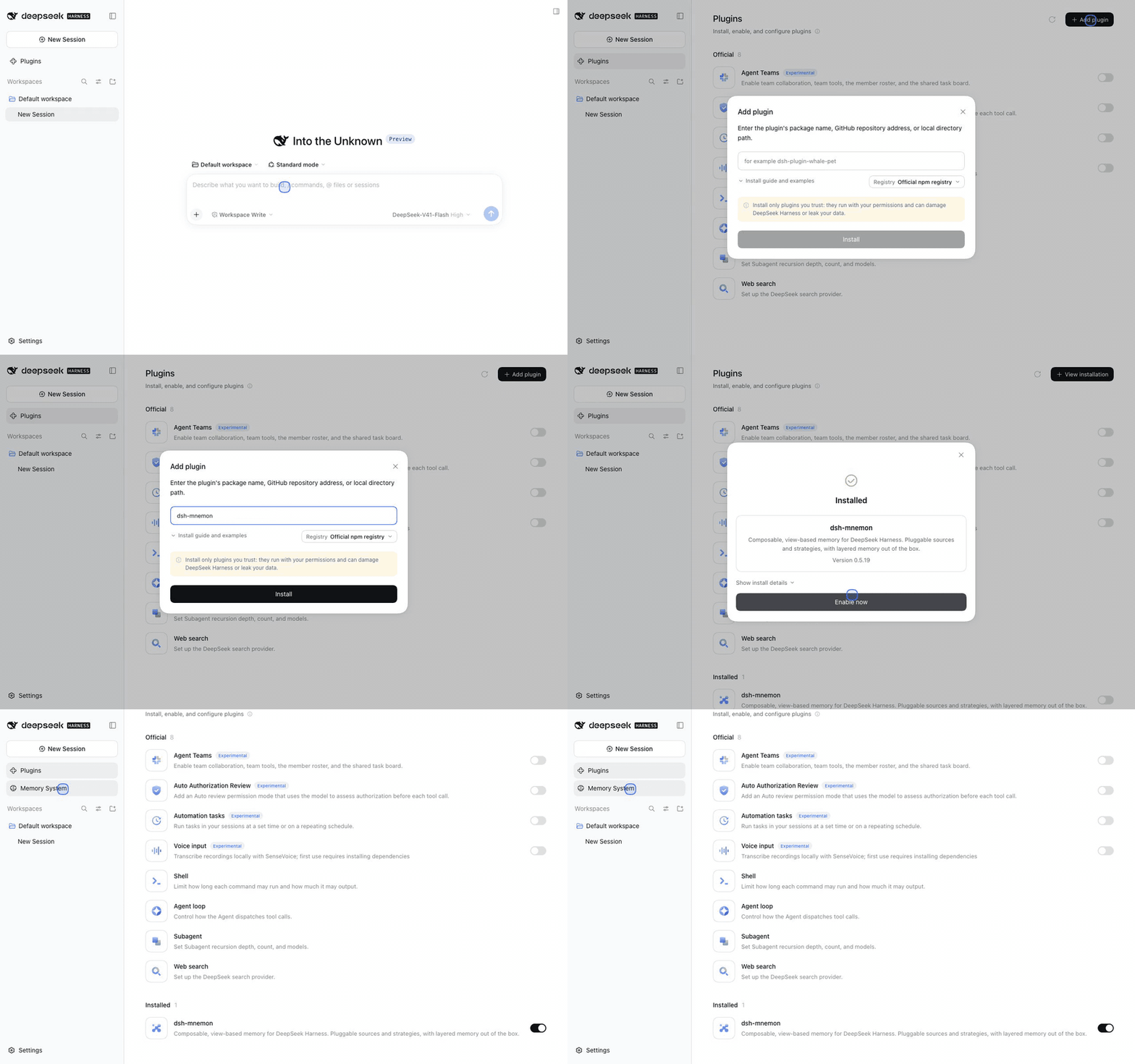
- In the page that opens, click Plugins → Add plugin, type
dsh-mnemon, click Install, then Enable now. - Open Memory System in the sidebar. Status shows each memory component and Provider.
- Tell a conversation something to remember. The turn memory bar under the reply lists what the turn read and wrote, and the brain mark saves a reply to memory.
- For Memory Spaces, install the Mnemon CLI for Mnemon Native with
npm install --global @mnemon-dev/mnemon, or enable another Provider on the Memory Spaces page. - Choose the main strategy and enhancements under Plugins → dsh-mnemon.
dsh-mnemon supports DSH 0.2.1-rc.2 (npm latest and next) and 0.2.0-rc.2. The same package serves the desktop app's Plugins page, dsh plugin --profile web add dsh-mnemon on the command line, and Headless with dsh plugin --profile headless add dsh-mnemon; older hosts keep the release compatibility and upgrades names for them. Getting started continues from here, and compatibility and upgrades covers existing installations.
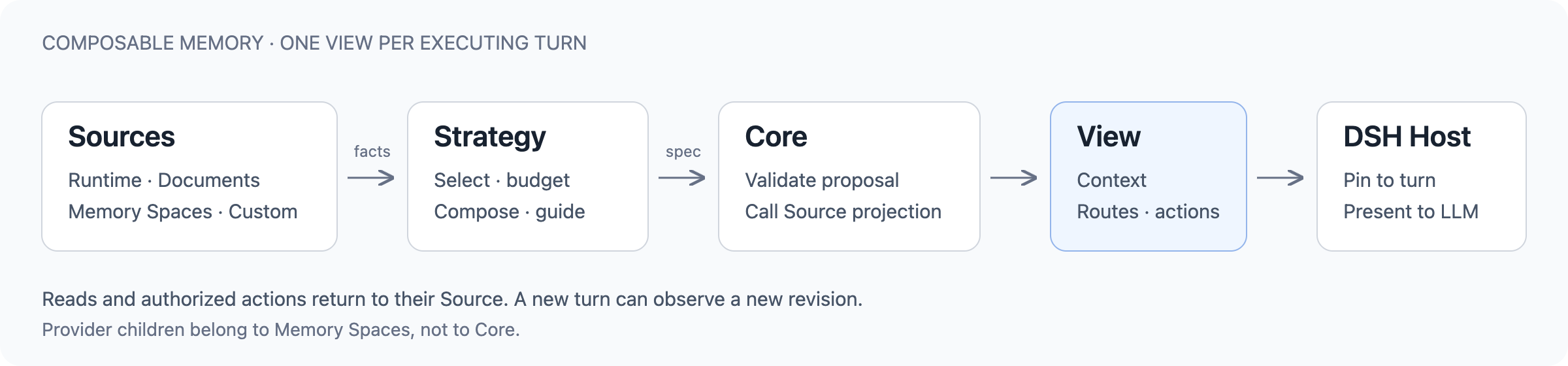
- Sources own memory and its operations: Runtime memory, Project Documents and Memory Spaces, whose Providers are its children.
- A Strategy decides how the available Sources take part in a turn: what stays resident, what can be searched, and which tools and budgets apply. Enhancements add to it through standard slots.
- Core validates the result into one immutable View for the turn. The DSH Host pins it to that turn and controls tool access.
The same public contracts serve the shipped plugins and external repositories. Architecture explains ownership, the turn lifecycle and the UI regions components contribute to.
The Starter pins a tested combination of independently versioned packages. One main strategy runs at a time; the enhancements are off until you turn them on.
| Package | Role | Default |
|---|---|---|
| dsh-mnemon-source-runtime | Runtime memory: USER.md, MEMORY.md, revisions and local storage | On |
| dsh-mnemon-source-documents | Project Documents: Markdown, search, revisions and archiving | On |
| dsh-mnemon-source-memory-spaces | Memory Spaces: durable evidence and their Providers | On |
| dsh-mnemon-source-skills | Skills (experimental): DSH skills with versions, self-evolution from real conversations, tests and backtests, and a market of skills.sh, GitHub and Agent Skills sites | On (self-evolution off) |
| dsh-mnemon-strategy-default-three-tier | Layered strategy: resident runtime memory, the rest on demand | Selected |
| dsh-mnemon-strategy-general | General strategy: every available source in one budget | Off |
| dsh-mnemon-strategy-auto-capture | Active capture: in-turn guidance to keep useful facts | Off |
| dsh-mnemon-strategy-light-context | Light context: a shared ceiling on resident context | Off |
| dsh-mnemon-strategy-scoped | Scoped composition: ordered sources and a writable subset | Off |
Memory Spaces Providers: Mnemon Native (default, local) · OpenViking · Honcho · Mem0 · Hindsight · Holographic · RetainDB · ByteRover · Supermemory. Third-party Providers stay off until configured; graph, deletion and enumeration capabilities differ by backend. See Providers.
Define a Source or Strategy with dsh-mnemon/extension-sdk, add an enhancement through the standard slots, or write a Memory Spaces driver with dsh-mnemon-source-memory-spaces/provider-sdk. A component can also add its own settings and Status card to the pages dsh-mnemon shows. Your repository owns its manifest, dependencies, tests and build; DSH installs and mounts it, and choosing it as the main strategy is a separate decision.
Start with the plugin author guide. Discuss new capabilities and Providers in an Issue before a pull request; see CONTRIBUTING.
- Runtime memory and Project Documents are local files; Mnemon Native is local. Third-party Providers use their own services and scopes.
- Turning a component off does not erase its memory, and changing the storage location does not move data. Use ZIP backup to carry it.
- Skills keeps its evolution data (suggestions, test cases and the conversations reviews read, with secrets redacted) in the local storage root, outside backups. An Agent follows a skill from the market as written, so preview it before installing.
- Git sync publishes the same Mnemon Pack payload as readable files to a repository you own, so another machine can pull it, with Sync now, Check remote before anything is written, or Automatic sync. When two machines wrote one subject differently, both wordings stay until you accept and apply a Memory reconciliation plan; see Git repository sync.
- Saved Provider credentials stay on the Host and are never exported. Backups still contain private memory; protect them.
- Sources and Strategies are trusted in-process JavaScript, not sandboxed code. Remembered history never outranks current instructions.
Backup and recovery · Security policy · Release history · Roadmap
pnpm install --frozen-lockfile
pnpm verify
pnpm verify:plugins
Use Node.js ^22.19.0 || >=24.0.0 and pnpm. node scripts/serve-e2e.mjs starts a disposable real WebUI; add --docs-demo for the seeded project behind these screenshots, and --live-model to have the DeepSeek API answer, with the key read from DEEPSEEK_API_KEY. Mechanical tests are not claims about model accuracy or live cloud Providers. Development and verification.
MIT. Third-party providers keep their own licenses and terms; see Third-party notices.