Hunk is a review-first terminal diff viewer for agent-authored changesets, built on OpenTUI and Pierre diffs.




- multi-file review stream with sidebar navigation
- inline AI and agent annotations beside the code
- split, unified, and responsive auto layouts
- watch mode for auto-reloading file and Git-backed reviews
- keyboard, mouse, pager, and Git difftool support
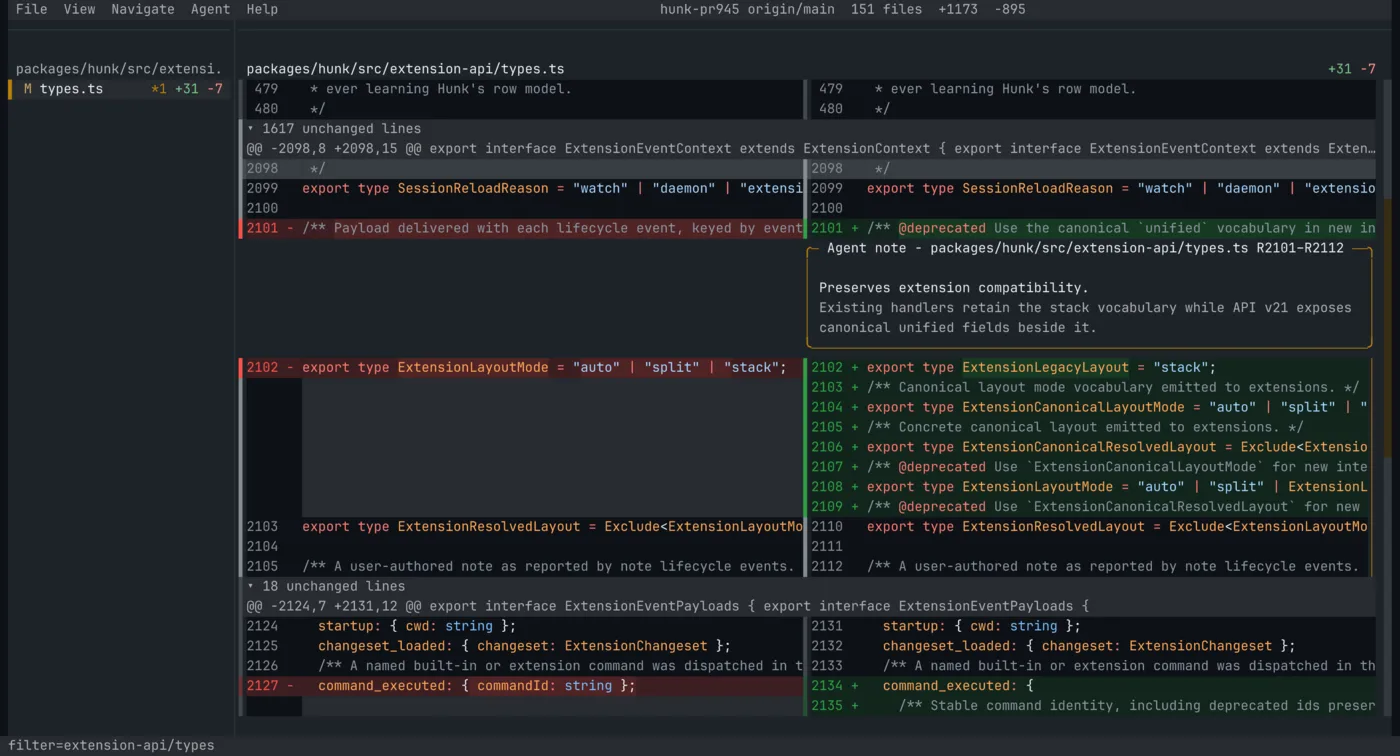
Split view with sidebar and inline AI notes |
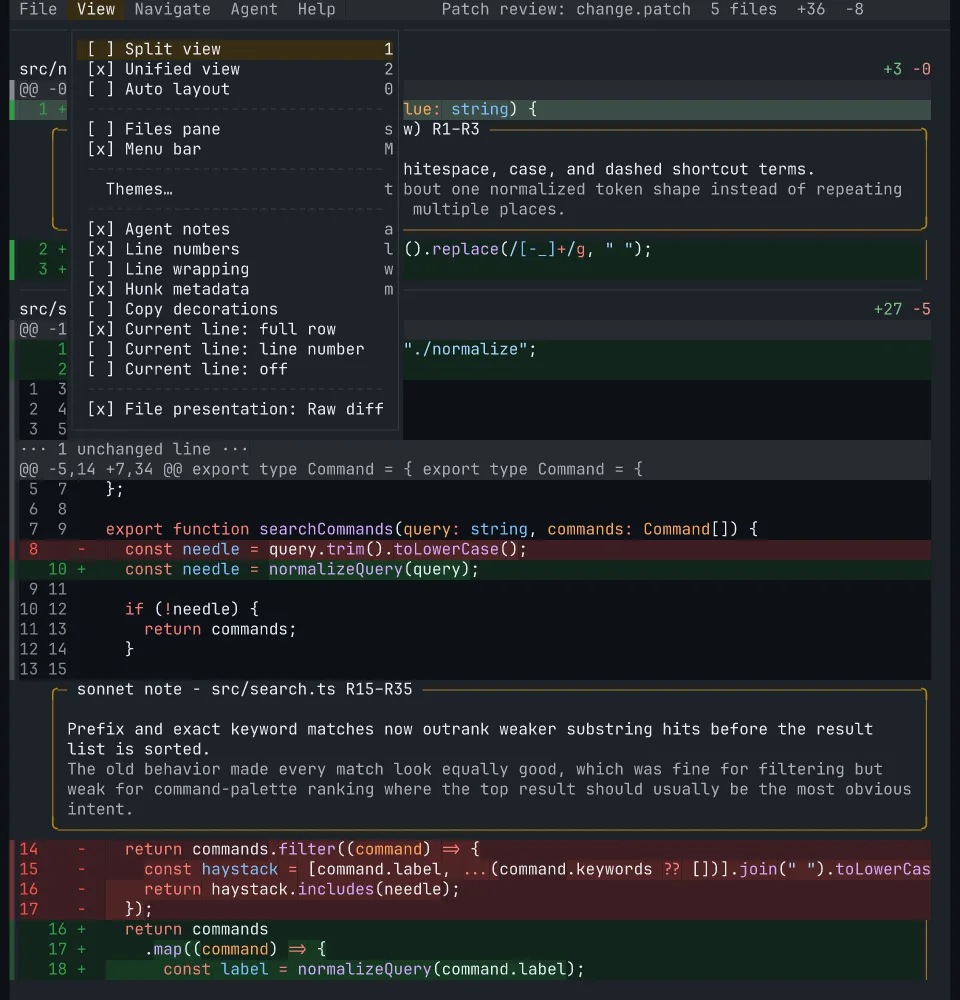
Unified view and mouse-selectable menus |
The default installation method on macOS and Linux downloads a standalone binary and installs it into ~/.hunk. It checks the archive against the release checksum when both SHA256SUMS and a supported checksum tool are available, and warns otherwise. Release discovery stays direct to GitHub while Hunk's anonymous aggregate endpoint is evaluated; set HUNK_ENABLE_RELEASE_PROXY=1 to opt into testing it:
curl -fsSL https://hunk.dev/install.sh | shWindows users can install with npm or mise. Other installation methods are also available:
npm i -g hunkdiff                    # macOS, Linux, or Windows; requires Node.js 22+
brew install hunk                    # macOS or Linux
mise use -g hunk                     # macOS, Linux, or Windows
Note
If you previously installed hunk via modem-dev/tap, be sure to uninstall it first with brew uninstall modem-dev/tap/hunk.
Windows requires mise 2026.8.6 or newer. Nix users can use the default package exported in flake.nix; see the Nix guide for details. Hunk also ships as a default tool in Omarchy, installed through mise.
Requirements:
- macOS, Linux, or Windows
- On x86-64, a CPU with SSE4.2 (Intel Nehalem 2008+, AMD Bulldozer 2011+); arm64 has no CPU feature floor
- Node.js 22+ for the npm install; the install script, Homebrew, mise, and Nix ship a standalone binary that does not require Node.js
- Git recommended for most workflows
Starting with Hunk 0.20, npm, Homebrew, and default install-script installs use Hunk’s canonical update command:
hunk update          # install the newest release
hunk update --check  # check without installing
hunk update 0.20.0   # select an exact npm or default install-script release
On an older release, update once with the installer or package manager that installed Hunk, then use hunk update going forward. Custom HUNK_INSTALL_DIR installs must re-run the installer with the same directory; mise, Nix, and source installs use their owning tools instead.
hunk           # show help
hunk --version # print the installed versionHunk mirrors Git's diff-style commands, but opens the changeset in a review UI instead of plain text.
hunk diff                      # review current repo changes, including untracked files
hunk --fast                    # experimentally offload eligible syntax highlighting
hunk diff --watch              # auto-reload as the working tree changes
hunk show                      # review the latest commit
hunk show HEAD~1               # review an earlier commit
hunk log                       # browse history on a terminal; print when redirected
hunk log --static              # force static output, paging when needed
hunk log is one auto-responsive, read-only history surface, not a repository manager. On a
terminal it opens the desktop history browser; pipes and redirects receive shell-native static
records automatically, and --static forces static output that pages only when needed. The selected VCS adapter
owns traversal, filtering, refs, and how a history item opens for review; the bundled Git and
Jujutsu adapters both implement that public capability. Static output keeps full commit, author,
date, message, branch/bookmark, remote, and tag details; --oneline provides compact records, and
--theme uses the same palette as Hunk review. Interactive history groups commits by local-calendar
day with account-like author handles and relative times, while keeping commit ids right-aligned and
clickable. Enable Graph view from the View menu to replace day groups with commit-topology lanes.
Press v and move with Up/Down or k/j to select a contiguous range. Shift+Up/Shift+Down, uppercase K/J, and Shift-click extend directly. Escape collapses the selection; opening the range
reviews the inclusive cumulative change from the oldest commit's parent through the newest commit.
History also shares review's b/f full-page and u/d half-page movement keys.
Range selection is disabled with --all or author, message, date, and path filters because traversal can interleave or hide commits.
After opening a commit or range, quit its normal Hunk review to return to the same selection.
History controls are configurable through canonical hunk.history.* keybindings.
Hunk auto-detects Jujutsu and Sapling checkouts, so hunk diff [revset] and hunk show [revset] use native revsets inside jj or Sapling workspaces. hunk log --vcs jj also reads JJ history directly, including in a non-colocated workspace. To override VCS detection, set vcs = "git" or vcs = "jj" or vcs = "sl" in config.
hunk diff --files before.ts after.ts        # compare two files directly
hunk diff --files before.ts after.ts --watch # auto-reload when either file changes
git diff --no-color | hunk patch -          # review a patch from stdin
Watch mode remains continuous. Direct-file and Git-backed reviews normally use filesystem observation to refresh promptly, with periodic polling retained as a fallback for missed events or unavailable watchers. Jujutsu and Sapling reviews currently use polling rather than filesystem observation.
- Open Hunk in another terminal with
hunk difforhunk show. - Tell your agent to add the skill file returned by
hunk skill path. - Ask your agent to use the skill against the live Hunk session.
A good generic prompt is:
Load the Hunk skill and use it for this review. Run `hunk skill path` to get the skill path.
For the full live-session and --agent-context workflow guide, see the agent workflow guide. Experimental rich STML note bodies require starting the review with --experimental; plain agent notes remain the default.
| Capability | hunk | lumen | difftastic | delta | diff-so-fancy | diff |
|---|---|---|---|---|---|---|
| Review-first interactive UI | ✅ | ✅ | ❌ | ❌ | ❌ | ❌ |
| Multi-file review stream + sidebar | ✅ | ✅ | ❌ | ❌ | ❌ | ❌ |
| Inline agent / AI annotations | ✅ | ❌ | ❌ | ❌ | ❌ | ❌ |
| Responsive auto split/unified layout | ✅ | ❌ | ❌ | ❌ | ❌ | ❌ |
| Mouse support inside the viewer | ✅ | ✅ | ❌ | ❌ | ❌ | ❌ |
| Runtime view toggles | ✅ | ✅ | ❌ | ❌ | ❌ | ❌ |
| Syntax highlighting | ✅ | ✅ | ✅ | ✅ | ❌ | ❌ |
| Structural diffing | ❌ | ❌ | ✅ | ❌ | ❌ | ❌ |
| Pager-compatible mode | ✅ | ❌ | ✅ | ✅ | ✅ | ✅ |
Hunk is optimized for reviewing a full changeset interactively.
You can persist preferences to a config file:
~/.config/hunk/config.toml.hunk/config.toml
Example:
theme = "github-dark-default" # any built-in theme id, auto, or custom
mode = "auto"        # auto, split, unified
vcs = "git"          # git, jj, sl
watch = false
exclude_untracked = false
line_numbers = true
tab_width = 4        # tab stops, 1-16
file_gap = 1         # rows between files, including the ─ rule; 0 hides it
hunk_gap = 0         # blank rows before later hunks
wrap_lines = false
menu_bar = true
animations = true
sidebar = "auto"     # "auto", true, false
agent_notes = false
prompt_save_view_preferences = true
transparent_background = false
Choose a built-in theme, auto, or a custom theme with theme. See
the theme guide for automatic selection, custom theme tables,
syntax scopes, and legacy syntax-table migration.
exclude_untracked affects Git/Sapling working-tree hunk diff sessions only.
tab_width controls source-code tab stops and can be overridden with -x4 or --tab-width 4.
file_gap is separator height between files, including the ─ rule; hunk_gap is blank rows before later hunks.
Set animations = false to make panes open and close immediately.
prompt_save_view_preferences = false disables the quit prompt for saving changed view preferences.
transparent_background can also be written as transparentBackground.
Every keyboard shortcut is a named command, and a [keybindings] table in your
user config remaps command ids to the keys you want them on — several keys per
command, exclusive claims over defaults, and false to unbind. See
the keybinding guide for the rules, the chord grammar,
and the full table of built-in commands and their default keys.
Set Hunk as your Git pager so git diff and git show open in Hunk automatically:
Note
Untracked files are auto-included only for Hunk's own hunk diff working-tree loader. If you open git diff through hunk pager, Git still decides the patch contents, so untracked files will not appear there.
git config --global core.pager "hunk pager"Or in your Git config:
[core]
    pager = hunk pager
If you want to keep Git's default pager and add opt-in aliases instead:
git config --global alias.hdiff "-c core.pager=\"hunk pager\" diff"
git config --global alias.hshow "-c core.pager=\"hunk pager\" show"To use Hunk as jj's pager, run jj config edit --user and update:
[ui]
pager = ["hunk", "pager"]
diff-formatter = ":git"To use Hunk as Sapling's pager, run sl config -u and update:
[pager]
pager = hunk pagerThe extension API is experimental and may change in breaking ways between minor releases while it stabilizes; breaking changes are called out in release notes.
Hunk loads plain TypeScript extensions from ~/.config/hunk/extensions/, from a
repository's .hunk/extensions/ (after you explicitly trust that repository),
and from --extension <path> for development. --no-extensions turns those off
for one run; Hunk's own bundled backends (Git, Jujutsu, and Sapling) stay loaded.
An extension can add generic top-level CLI workflows, contribute themes and file-extension → language mappings, add a VCS backend, rewrite the changeset before review (collapse lockfiles, reorder files by review priority), replace the file-navigation sidebar with its own React component, react to lifecycle events, and show transient messages:
// ~/.config/hunk/extensions/collapse-lockfiles.ts
import type { HunkExtensionAPI } from "hunkdiff/extension";

export default function (hunk: HunkExtensionAPI) {
  hunk.transformChangeset((changeset, ctx) => {
    const files = changeset.files.filter((file) => !file.path.endsWith(".lock"));
    ctx.notify(`Collapsed ${changeset.files.length - files.length} lockfiles`);
    return { ...changeset, files };
  });
}
Extensions shared as git repositories install straight from their host, and a
hunk-extension GitHub topic marks community ones:
hunk extension install acme/hunk-word-diff@v1.2.0   # or git:host/path, a URL, a local path
hunk extension list                                 # then update [name] / remove <name>
Browse community extensions at github.com/topics/hunk-extension; publish yours by pushing the extension to a repository root and adding that topic.
See the extension guide for the full API, the trust model,
publishing guidance, and the [extensions] / [extension.<id>] config reference.
Installable examples include a dependency-free
hunk gh 123 GitHub PR workflow,
review triage,
authoritative review snapshot export, an optional
rendered Markdown file view, and a
Vim navigation mode built from public semantic commands.
Hunk also publishes HunkDiffView and lower-level primitives from hunkdiff/opentui for embedding the same diff renderer in your own OpenTUI app.
See the OpenTUI component guide for install, API, and runnable examples.
Ready-to-run demo diffs live in the examples directory.
Each example includes the exact command to run from the repository root.
💬 Chat with users/contributors on the Modem Discord server
For source setup, tests, packaging checks, and repo architecture, see the contribution guide.
Sponsored by Modem.
