Repository navigation
Release
Here is the docsify release process.
- Create a release PR. New pull request
Note
You can write the Changelog manually, such as #1524
Waiting for a review from @docsifyjs/reviewers
- Pull the latest changes
Note
Your local develop and main branches should be up to date with the remote.
git clone git@github.com:docsifyjs/docsify.git- Check whether you have npm access or not
Note
If not, please contact @docsifyjs/reviewers
- Checkout the develop branch
Note
The current default branch is develop, you can skip this step.
- Install dependencies
npm i - Run all tests
npm test-
Make sure the lib, theme folder and others are created and verify the numbers of files present in the lib theme and src
-
Run publish script
Important
You should ensure you are logged into npmjs. You can check this by running npm whoami.
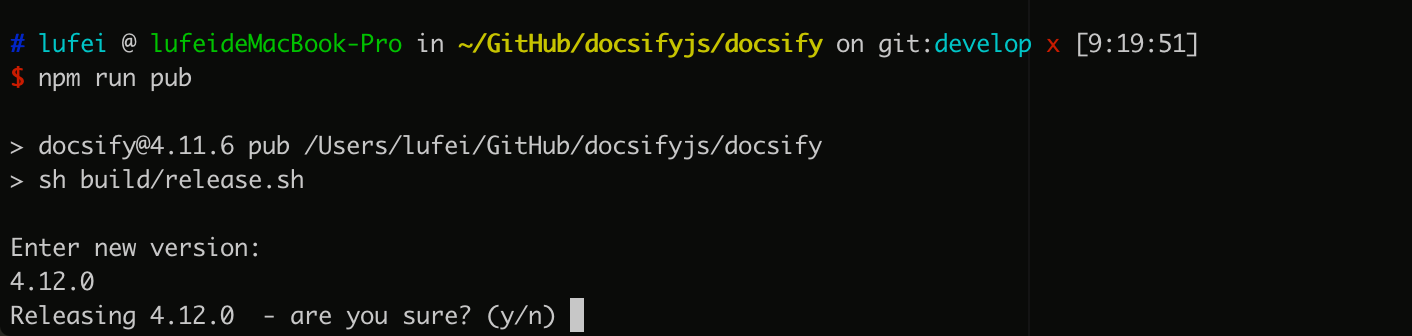
npm run pub- it will ask for the version, give the version. such as:
4.12.0 - It will do the release. F.e. ed4b5be6
- It will also push the changes to the develop branch (verify this)
Note
The changelog may need to be updated. If there are changes, remember to describe them. F.e. a2132c89
Note
Do not update snapshots during this time. Snapshot updates must be reviewed and approved via the regular pull request process to ensure we're not snapshotting bugs.
- Checkout the
mainbranch
git checkout main- Pull the changes from remote develop
git merge develop- Push the changes to
main
git push- Release the version tag to GitHub
Go to https://github.com/docsifyjs/docsify/releases
- Check the version of both docsify
and docsify-server-rendererin npm
- Compare the
developandmainbranches in our github
Note
there should not be any differences in commits; both should be same.
-
Check the changelogs in both branches
-
The release PR (4.12.0) should be merged/closed automatically by now
Note
if not then there is some problem.