

A C++20 3D library you can take one layer at a time: draw with the GPU in a few lines, simulate a world without any screen, or build a full 3D scene like in Three.js. Each layer works without the ones above it.
Compages is a Latin word: an assembly of parts that lock together into one whole. Here, three layers: GPU, world and renderer.
Compages is used for real work:
- RobotIK, a robot kinematics library, uses it for its world, its simulator and its painted canvases.
A 3D program does two jobs:
- Simulate: things exist and move. A robot arm turns its joints, heat spreads in a plate, a character walks. This is only numbers in memory, so it can run in a unit test, with no window.
- Show: a camera looks at this world and the graphics card draws it, sixty times per second.
Most 3D engines do both jobs at once and give you everything: a window, an editor, a scene format, a physics engine. You wanted to draw a curve, and you got a game engine. Compages gives you three layers instead. Use the lowest layer that does your job:
| Layer | Use it when you have… | You write… | Inspired by |
|---|---|---|---|
| 🟧 GPU | a shader and arrays of numbers | drawable["position"] = list_of_points; drawable.draw(); |
Glumpy |
| 🟦 World | things that move, with or without a screen | world.entity("Ship").child("Gun"), your structs as components |
Three.js + an ECS |
| 🟩 Renderer | a world you want to see | scene.box("Cube", color(1, 0, 0)); scene.draw(frame); |
Three.js |
Who it is for:
- 🔬 Scientists draw and compute on the GPU (a galaxy, heat in a plate) without learning the OpenGL state machine. The GPU layer is often enough.
- 🤖 Robotics gets a world that runs in unit tests and CI with no OpenGL context at all, and the same world drawn when you want to see it.
- 🎮 Games get short scene code like Three.js, glTF models, animations and cameras, in C++. They use all three layers.
- 🧑🏫 Learners get a gallery of more than seventy small demos, each adding one idea, with its source shown next to the picture, and tutorials that build a robot workshop step by step. Try the gallery in your browser (WebGL 2).
Compages draws and simulates. It does not try to be a full game engine:
- 🧲 No physics engine. Bring your own (Bullet, Jolt, PhysX, MuJoCo…): mark an entity
PoseDriver::Externaland the engine writes its pose each frame. The demo07e_ExternalPhysicsshows how, in a few lines. - 🔇 No sound. Use an audio library next to it (OpenAL, miniaudio…).
- 🌐 No network, no multiplayer.
- 🛠️ No editor. Your scene is code: your window, your loop.
- 🖥️ One platform. OpenGL 4.5 only, on Linux. No consoles, no web, no Vulkan or Metal. For these, look at Godot, Unity, Unreal, Three.js, or a renderer on every graphics API (bgfx, sokol, Filament).
Here is a hello-world example drawing a single triangle. The shader declares position and color; C++ fills them by name; draw() sends what changed.
compages::gpu::Drawable triangle;

// At setup
COMPAGES_TRY(triangle.loadSources(VERTEX_SHADER, FRAGMENT_SHADER));   // GLSL: in vec2 position; in vec3 color;
triangle["position"] = { { -0.8f, -0.6f }, { 0.8f, -0.6f }, { 0.0f, 0.8f } };
triangle["color"]    = { { 1, 0, 0 }, { 0, 1, 0 }, { 0, 0, 1 } };

// Every frame
compages::gpu::clear({ 0.1f, 0.1f, 0.15f });
triangle.draw();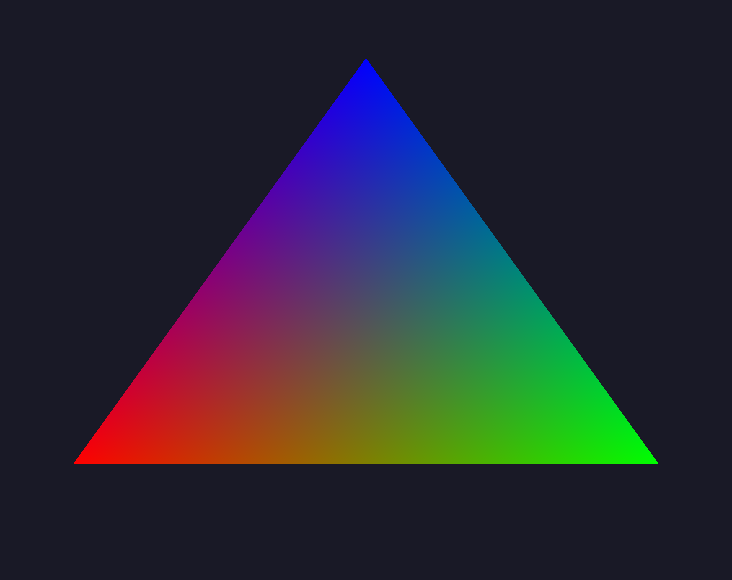

The same door leads to simulations: in 05f_Galaxy, only 300 lines are needed to simulate 8000 stars attract each other in a compute shader, and the drawable reads the buffer the computation just wrote. This screenshot on the right shows initial step of the galaxy simulation.
struct Velocity { compages::Vector3f value; };      // your data: a plain struct

compages::world::World world;
compages::world::Entity ship = world.entity("Ship").set(Velocity{ { 1, 0, 0 } });
ship.child("Gun").position(0.0f, 0.5f, 0.0f);             // the gun follows the ship

world.each<Velocity>([&](compages::world::Entity e, Velocity& v) {   // a system: a plain loop
    e.position(e.position() + v.value * compages::toSeconds(step.elapsed));
});
world.update(step);                                       // routines, joints, matrices
This runs in a unit test, with no OpenGL. Joints too: .revolute(axis, -90.0_deg, 90.0_deg).joint().angle(30.0_deg), and the children follow.
using namespace compages::si::literals;   // 1.0_rad_per_s, 0.5_s, 90.0_deg
compages::renderer::Scene scene(world);

// At setup
scene.camera().position(0.0f, 1.0f, 3.0f).add<compages::world::Orbit>();
scene.sun("Sun", { 1.0f, 0.95f, 0.85f }, 1.4f);
compages::world::Entity cube = scene.box("Cube", compages::renderer::color(0.9f, 0.18f, 0.12f));

// Every frame
cube.rotate(1.0_rad_per_s * frame.elapsed, { 0.4f, 1.0f, 0.0f });   // a speed times a time is an angle
scene.draw(frame);
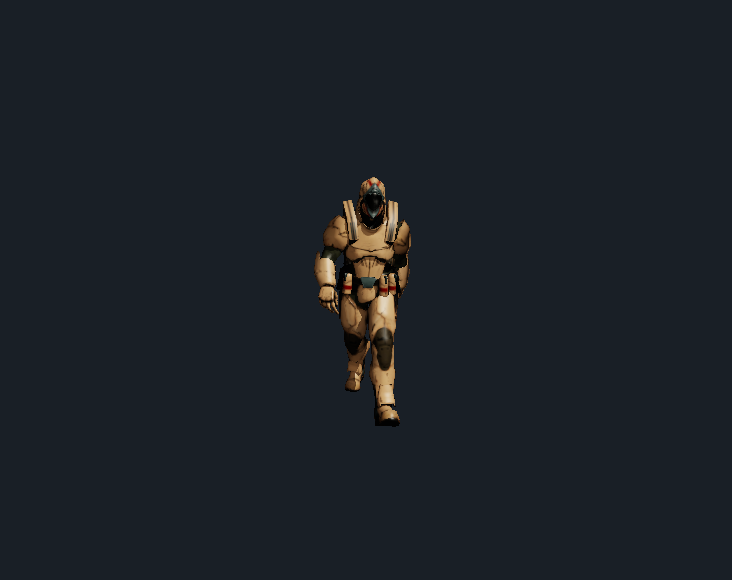
On the right, in 08b_GltfAnimation, the scene.loadFile(...) reads glTF files and animations (used in games). The gallery has a small Doom-like game. STL and URDF files (for robotics with their joints) can also be loaded. The gallery also has a robot arm example moved by its joints (forward kinematics).
The same three layers are enough for science and for games. Two demos of the gallery:
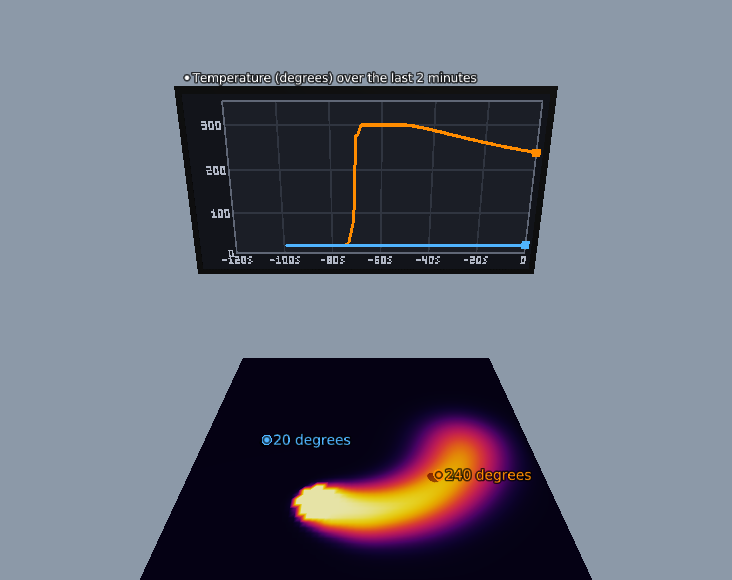
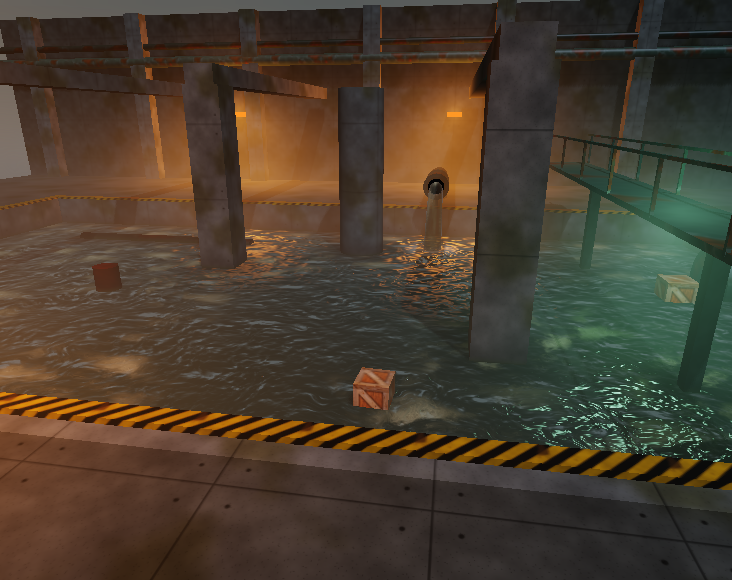
| 🔬 Heat in a plate, with live charts | 🌊 Water flowing over a terrain |
|---|---|
 |
 |
11h_Thermometers: a heat equation on a Field<float>, probes and curves painted on a board. |
10f_FlowingWater: water on a height field, with ripples and mist. |
Run them with ./build/linux-gcc-debug/bin/Compages-examples 11h_Thermometers (or 10f_FlowingWater).
| 🧱 Compages | Raw OpenGL | Glumpy | Three.js | Unity / Godot | |
|---|---|---|---|---|---|
| Language | C++20 | C | Python | JavaScript | C# / GDScript |
| Triangle in a few lines | ✅ the shader names the data | ❌ dozens of calls | ✅ | ✅ | ✅ (in the editor) |
| CPU → GPU copies hidden | ✅ one flush at draw() |
❌ | ✅ | ✅ | ✅ |
| Compute shaders, ping-pong | ✅ | ✅ (by hand) | ❌ ping-pong only, no compute | WebGL limits | ✅ |
| Scene graph in chained calls | ✅ | ❌ | ❌ | ✅ | ✅ (editor) |
| ECS, cache-friendly data | ✅ | — | ❌ | ❌ | Unity DOTS (separate) |
| Simulation without any screen | ✅ a whole layer for it | — | ❌ | ❌ | ✅ headless mode, but the whole engine |
| Use only the part you need | ✅ three independent layers | — | ✅ | ❌ | ❌ |
| A library, not an editor | ✅ your window, your loop | ✅ | ✅ | ✅ | ❌ |
Compages puts together the Glumpy way of talking to the GPU, the Three.js way of building scenes, an ECS world that runs headless, and Unity-like routines, as three layers you can use one at a time.
You need Linux, a C++20 compiler, Make, CMake, Git, pkg-config, GLFW and an OpenGL 4.5 driver.
Note:
- macOS stops at OpenGL 4.1 I will see how to manage this.
- Compages does not use CMake directly but uses Makefile.
All details (Fedora, CI without screen, system install) are given in the document build and install.
git clone --recurse-submodules https://github.com/Lecrapouille/Compages.git

cd Compages
make
# Optional: sudo make install
You can run the demos:
./build/linux-gcc-debug/bin/Compages-examplesKeyboard keys: PgUp / PgDn change demo, F1 hides the panels. Then follow the tutorials.
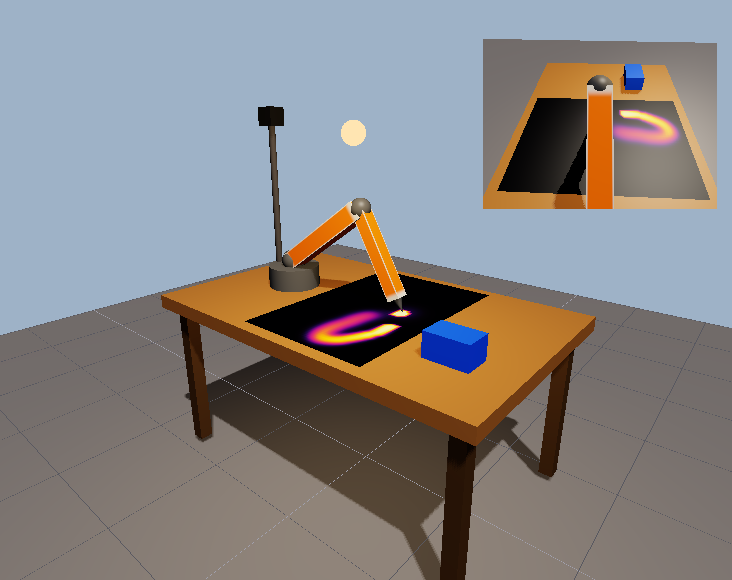
Start with the tutorials. They follow the three stacked-layer: a shader and some numbers on the GPU, then a robot arm in a World with no screen, then the workshop above drawn by the Renderer, one idea per page.
The documentation follows Diátaxis: learn, complete a task, understand, or look up a fact.
- Tutorials teach through a sequence of small programs and observable results.
- Guides give steps for a task in an existing application.
- Explanations cover design in concepts, rendering algorithms in techniques, and whole demos in case studies.
- Reference lists calls, shader interfaces, source locations and gallery options.
Coding agents: AGENTS.md and the skills of .claude/skills/.
Compages comes from SimTaDyn, a student project to draw maps, and from OpenGLCppWrapper, a C++ version of the Glumpy idea: the shader names its data and draw() hides the copies to the GPU. That wrapper could not do ping-pong passes nor a real scene graph, and the project stopped for some years. Compages is the rewrite that fixes this, with an ECS world (EnTT) and Unity-like routines without class inheritance.
Compages is dual-licensed: GNU GPL v3 or later, or a commercial license for those who cannot use the GPL. See LICENSING.md.