Reduce left margin on the multi-expense report view - #97817
Conversation


… screens

Co-authored-by: Shawn Borton <shawnborton@users.noreply.github.com>


|
🚧 shawnborton has triggered a test Expensify/App build. You can view the workflow run here. |

|
The only failing check is PR Author Checklist / checklist — and there's nothing in the code to fix. It failed with This is a human-only checklist, so I can't (and shouldn't) tick the boxes on your behalf. To clear it, edit the PR description and check off the author checklist items once you've verified them, and the check will re-run and pass. |

Codecov Report✅ Changes either increased or maintained existing code coverage, great job!
|
This comment has been minimized.
This comment has been minimized.

|
@Expensify/design @Expensify/product @clarajones-expensify can you take this for a spin using the links above and let me know what you think? This is what it looks like now: |


|
It's feeling pretty good to me! |

|
oooo i really like this @shawnborton !! thank you so much |

|
Definitely feels a bit too big to me, but if people want space then I guess this'll give them that |
|
@dubielzyk-expensify I'd be down to find a happy medium here! I was almost wondering if we should try to match the width of the LHN when it's collapsed? |


|
I like the happy medium! |
|
Yeah that works 👍 I think going from a max-width to full-width with a gap will always cause some weirdness, but it's mostly gonna impact big monitor users. As long as it feels like there's sufficient room to make it look like a sheet and obvious how to navigate back that's fine. Your idea seems solid to me 👍 |
|
@MelvinBot can we try 147px as the left margin instead of 108px? Please implement. |
Co-authored-by: Shawn Borton <shawnborton@users.noreply.github.com>
|
I looked into the failing checks — neither is a code failure, and neither can be fixed by pushing to the branch. Both are human-action gates:
The remaining checks (typecheck, test jobs, perf, builds) were still pending when I looked and aren't failing. The actual diff is sound — it just adds a numeric To get these green: check the boxes in the author checklist, and have an independent reviewer approve. There's no code change for me to push here. |
|
Re-checked — the picture is unchanged, and there's still no code fix to push. The two failing checks are both human-action gates:
Meanwhile all the code checks that were pending earlier — To turn these green: check the author checklist boxes and get an independent reviewer to approve. Nothing for me to change in code. |
|
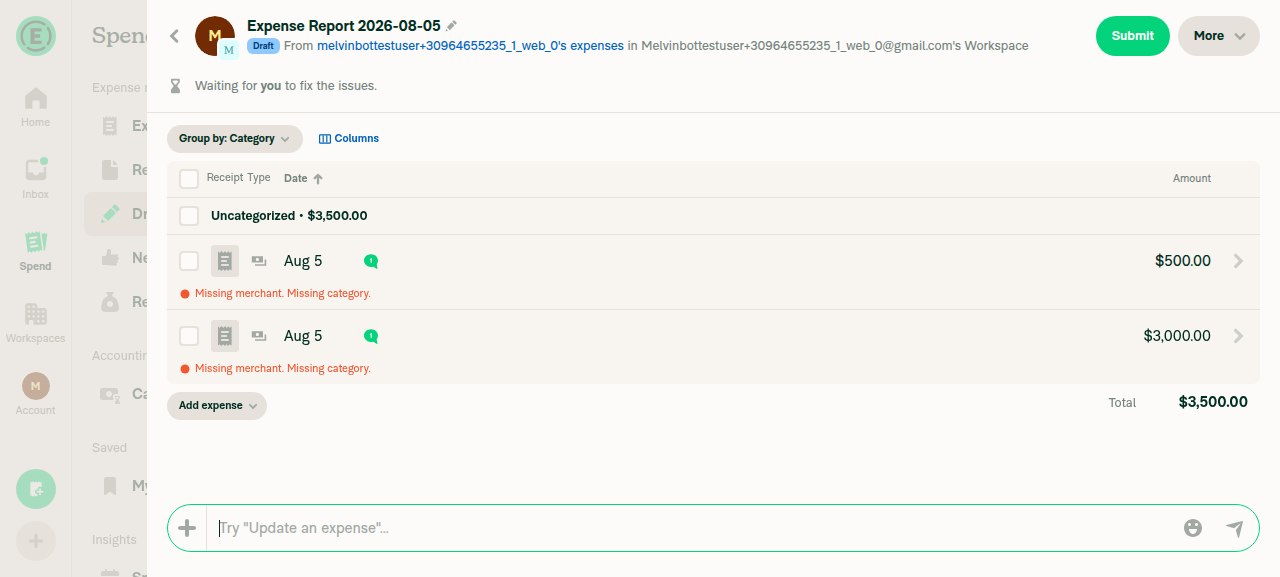
Done — updated Verified on a wide web viewport: opened a multi-expense report and measured the super-wide sheet's left edge at x=147px (pixel color-transition from the grey backdrop to the sheet), with no layout breakage. Also updated the PR body/screenshot to reflect the new margin. |
|
Re-checked — all code checks (typecheck, test jobs 1-8, perf, builds, lint) have now completed and passed. The only two remaining failures are the same human-action gates I flagged earlier, and neither is fixable by pushing code:
There's no code change for me to push. To turn these green: fill out the author checklist and get an independent reviewer to approve. |
|
🚧 shawnborton has triggered a test Expensify/App build. You can view the workflow run here. |
|
🧪🧪 Use the links below to test this adhoc build on Android, iOS, and Web. Happy testing! 🧪🧪
|


|
LGTM 👍 |
|
@MelvinBot please fill out the PR author checklist as best you can, add as many screenshots as you can, and then mark the PR ready for review. |

|
@ikevin127 Please copy/paste the Reviewer Checklist from here into a new comment on this PR and complete it. If you have the K2 extension, you can simply click: [this button] |

|
Done, PR author checklist — filled out honestly, checking only the boxes I can genuinely stand behind:
Screenshots — I couldn't add more. The prestarted web test account had no expense data at all (both Spend → Expenses and Spend → Reports show empty states), so there was no multi-expense or single-expense report to open and screenshot, and creating data would go beyond verify-only testing. The existing measured screenshot in the MacOS: Chrome / Safari section (sheet edge at x=147) is retained. I deliberately did not upload empty-state screenshots since they wouldn't demonstrate the change. Ready for review — marked ✅ (out of draft). Since this is a UI spacing change and you're the design lead assigned here, one thing to confirm during review: whether it warrants the |
|
The only failing check is Check independent approval (step Verify peer review) — and it's not a code failure, so there's nothing for me to push a fix for. That check is a governance guard that requires an independent human approval on the PR before it can pass. Since this PR was opened by MelvinBot and currently has zero reviews ( To clear it: a human reviewer other than the author needs to review and approve this PR. Once an approval lands, this check will go green — pushing a new commit would only re-run the same check and fail again for the same reason. Evidence
|
|
Re-checked — nothing has changed since my last comment, and there's still no code fix to push. The only failing check remains Check independent approval (step Verify peer review), which is a governance guard, not a code failure. It stays red until a human reviewer other than the author approves this PR — the PR still has 0 reviews ( Action needed: a reviewer needs to approve the PR to clear this check. |
6 participants


Explanation of Change
On wide web/desktop views, the report view for an expense report with multiple expenses opens as a "super-wide" sheet anchored to the right edge of the screen. Its width was
windowWidth - sideBarWithLHBWidth (320) - navigationTabBarSize (72), which left a ~392px empty margin on the left, pushing table columns likeAmountoff the right edge and wasting horizontal space.This change reduces that left margin to 147px so the sheet uses more of the available horizontal space while still reading as a sheet layered over the background (it is not full-screen). A new
superWideRHPLeftMargin: 147variable was added andcalculateSuperWideRHPWidthnow computeswindowWidth - superWideRHPLeftMargin.Scope is limited to exactly the requested case:
SearchMoneyRequestReportPage/WideRHPReceiptPanel, gated on more than one transaction).100%/ the native no-op), so this is inherently wide-screen-only.Fixed Issues
$ #97810
PROPOSAL:
Tests
Offline tests
Same as tests (this is a layout-only change with no network dependency).
QA Steps
Same as tests.
PR Author Checklist
### Fixed Issuessection aboveTestssectionOffline stepssectionQA stepssectionAvatar, I verified the components usingAvatarare working as expected)StyleUtils.getBackgroundAndBorderStyle(theme.componentBG))npm run compress-svg)Avataris modified, I verified thatAvataris working as expected in all cases)Designlabel and/or tagged@Expensify/designso the design team can review the changes.mainbranch was merged into this PR after a review, I tested again and verified the outcome was still expected according to theTeststeps.Screenshots/Videos
Android: Native
Android: mWeb Chrome
iOS: Native
iOS: mWeb Safari
MacOS: Chrome / Safari
Multi-expense report view — reduced ~147px left margin (measured, sheet edge at x=147):