Skip to content

Fix receipts dropping after iOS app upgrade due to stale container paths - #97814

Open
adhorodyski wants to merge 12 commits into
Expensify:mainfrom
callstack-internal:upgrade-receipt-drop
Open

Fix receipts dropping after iOS app upgrade due to stale container paths#97814
adhorodyski wants to merge 12 commits into
Expensify:mainfrom
callstack-internal:upgrade-receipt-drop

Conversation

@adhorodyski

@adhorodyski adhorodyski commented Aug 4, 2026

Copy link
Copy Markdown
Contributor

Explanation of Change

On iOS the app stores the full path to a receipt:

file:///var/mobile/Containers/Data/Application/<UUID>/Documents/Receipts-Upload/x.jpg

Most app upgrades change the <UUID>. iOS moves the file into the new container. The stored path still names the old container. When a queued expense uploads, the file check fails and the app sends the expense with no receipt. The user gets a $0 expense and no error. The file was on disk the whole time.

This PR stops storing the path. The new ReceiptStorage module owns the Receipts-Upload folder. adopt moves a receipt into the folder at capture and returns the bare filename. resolve joins that filename to the folder's current location, at the moment of upload or display. The number of upgrades in between does not matter, so receipts already in the offline queue recover too.

adopt now rejects when a file does not land in the folder. Capture fails at once, where the user can retake the photo, instead of storing a path that loses the receipt hours later.

Fixed Issues

$ #97979
PROPOSAL:

Tests

iOS: recover a queued receipt across an app upgrade (the core fix)

  1. Go offline (airplane mode or dev network toggle)
  2. FAB → Create expense → Scan, take a photo of a receipt, choose a participant, and submit — the request stays in the offline queue
  3. Verify the expense preview shows the receipt image
  4. Force-quit the app, then install a new build over the existing one (e.g. run npm run ios again) — iOS rotates the app's data container path on install-over, which is exactly what an App Store upgrade does
  5. Open the app and verify the queued expense's receipt preview still renders
  6. Go online
  7. Verify the expense uploads with the receipt attached — open the expense and confirm the receipt image is there, not a receiptless expense

Gallery pick (iOS and Android native)

  1. FAB → Create expense → Scan → pick an image from the gallery
  2. Verify the receipt shows on the confirmation screen and the submitted expense has it attached
  3. On Android this exercises the cross-filesystem move (app cache → Downloads), so run it on Android specifically

Crop / rotate

  1. Open a draft or submitted expense's receipt → rotate it, then crop it, saving each time
  2. Verify the edited receipt is applied and still attached after submit

Odometer (native)

  1. FAB → Create expense → Distance → Odometer → attach an odometer image from the gallery
  2. Verify the image is attached to the draft

Distance placeholder regression

  1. Create and submit a distance expense
  2. Verify it submits normally (its bundled placeholder receipt must not trip the file check)

Web regression

  1. FAB → Create expense → Scan → upload a receipt file
  2. Verify the flow works end to end
  • Verify that no errors appear in the JS console

Offline tests

The core scenario above runs offline by design. Additionally:

  1. Go offline, capture a receipt via Scan, submit
  2. Force-kill and relaunch the app (no upgrade)
  3. Verify the queued expense still shows its receipt, then go online and verify it uploads with the receipt

QA Steps

iOS upgrade recovery (the core fix)

  1. On iOS, install the previous staging build
  2. Go offline, create a Scan expense with a photo, and submit it
  3. Force-quit the app
  4. Install the staging build containing this change over the old one (upgrade, do not delete the app)
  5. Open the app and go online
  6. Verify the queued expense uploads with the receipt image attached

Regression sweep

  1. iOS and Android: create a Scan expense with a camera photo online — verify the receipt is attached
  2. iOS and Android: create a Scan expense from a gallery image — verify the receipt is attached
  3. Rotate and crop a receipt on an existing expense — verify the edit saves
  4. Create and submit a distance expense — verify it completes normally
  5. Web: create a Scan expense by uploading a file — verify the receipt is attached
  • Verify that no errors appear in the JS console

PR Author Checklist

  • I linked the correct issue in the ### Fixed Issues section above
  • I wrote clear testing steps that cover the changes made in this PR
    • I added steps for local testing in the Tests section
    • I added steps for the expected offline behavior in the Offline steps section
    • I added steps for Staging and/or Production testing in the QA steps section
    • I added steps to cover failure scenarios (i.e. verify an input displays the correct error message if the entered data is not correct)
    • I turned off my network connection and tested it while offline to ensure it matches the expected behavior (i.e. verify the default avatar icon is displayed if app is offline)
    • I tested this PR with a High Traffic account against the staging or production API to ensure there are no regressions (e.g. long loading states that impact usability).
  • I included screenshots or videos for tests on all platforms
  • I ran the tests on all platforms & verified they passed on:
    • Android: Native
    • Android: mWeb Chrome
    • iOS: Native
    • iOS: mWeb Safari
    • MacOS: Chrome / Safari
  • I verified there are no console errors (if there's a console error not related to the PR, report it or open an issue for it to be fixed)
  • I followed proper code patterns (see Reviewing the code)
    • I verified that comments were added to code that is not self explanatory
    • I verified that any new or modified comments were clear, correct English, and explained "why" the code was doing something instead of only explaining "what" the code was doing.
    • I verified any copy / text that was added to the app is grammatically correct in English. It adheres to proper capitalization guidelines (note: only the first word of header/labels should be capitalized), and is either coming verbatim from figma or has been approved by marketing (in order to get marketing approval, ask the Bug Zero team member to add the Waiting for copy label to the issue)
  • If a new code pattern is added I verified it was agreed to be used by multiple Expensify engineers
  • I followed the guidelines as stated in the Review Guidelines
  • I tested other components that can be impacted by my changes (i.e. if the PR modifies a shared library or component like Avatar, I verified the components using Avatar are working as expected)
  • If a new CSS style is added I verified that:
    • A similar style doesn't already exist
    • The style can't be created with an existing StyleUtils function (i.e. StyleUtils.getBackgroundAndBorderStyle(theme.componentBG))
  • If new assets were added or existing ones were modified, I verified that:
    • The assets are optimized and compressed (for SVG files, run npm run compress-svg)
    • The assets load correctly across all supported platforms.
  • If the PR modifies code that runs when editing or sending messages, I tested and verified there is no unexpected behavior for all supported markdown - URLs, single line code, code blocks, quotes, headings, bold, strikethrough, and italic.
  • If the PR modifies a generic component, I tested and verified that those changes do not break usages of that component in the rest of the App (i.e. if a shared library or component like Avatar is modified, I verified that Avatar is working as expected in all cases)
  • If the PR modifies a component related to any of the existing Storybook stories, I tested and verified all stories for that component are still working as expected.
  • If the PR modifies a component or page that can be accessed by a direct deeplink, I verified that the code functions as expected when the deeplink is used - from a logged in and logged out account.
  • If the PR modifies the UI (e.g. new buttons, new UI components, changing the padding/spacing/sizing, moving components, etc) or modifies the form input styles:
    • I verified that all the inputs inside a form are aligned with each other.
    • I added Design label and/or tagged @Expensify/design so the design team can review the changes.
  • I added unit tests for any new feature or bug fix in this PR to help automatically prevent regressions in this user flow.
  • If the main branch was merged into this PR after a review, I tested again and verified the outcome was still expected according to the Test steps.

Screenshots/Videos

Android: Native
Android: mWeb Chrome
iOS: Native
iOS: mWeb Safari
MacOS: Chrome / Safari

@codecov

codecov Bot commented Aug 4, 2026

Copy link
Copy Markdown

Codecov Report

❌ Looks like you've decreased code coverage for some files. Please write tests to increase, or at least maintain, the existing level of code coverage. See our documentation here for how to interpret this table.

Files with missing lines Coverage Δ
...ponents/ReportActionItem/ReportActionItemImage.tsx 72.13% <100.00%> (ø)
src/libs/fileDownload/checkFileExists/index.ts 100.00% <ø> (ø)
src/libs/prepareRequestPayload/index.native.ts 71.05% <100.00%> (+2.48%) ⬆️
src/libs/ReceiptStorage/index.native.ts 96.77% <96.77%> (ø)
src/libs/ReceiptUtils.ts 89.28% <0.00%> (ø)
...RequestStepScan/components/Camera/index.native.tsx 73.58% <0.00%> (ø)
src/libs/actions/IOU/Receipt.ts 77.64% <0.00%> (ø)
...s/fileDownload/validateReceiptFile/index.native.ts 0.00% <0.00%> (ø)
src/libs/ReceiptStorage/index.ts 0.00% <0.00%> (ø)
src/components/AttachmentPicker/index.native.tsx 19.16% <0.00%> (-0.17%) ⬇️
... and 2 more
... and 41 files with indirect coverage changes

@adhorodyski

Copy link
Copy Markdown
Contributor Author

@codex review

@chatgpt-codex-connector

Copy link
Copy Markdown

Codex Review: Didn't find any major issues. Another round soon, please!

Reviewed commit: 26ebf6018d

ℹ️ About Codex in GitHub

Codex has been enabled to automatically review pull requests in this repo. Reviews are triggered when you

  • Open a pull request for review
  • Mark a draft as ready
  • Comment "@codex review".

If Codex has suggestions, it will comment; otherwise it will react with 👍.

When you sign up for Codex through ChatGPT, Codex can also answer questions or update the PR, like "@codex address that feedback".

@mountiny

mountiny commented Aug 4, 2026

Copy link
Copy Markdown
Contributor

@MelvinBot review

@MelvinBot

Copy link
Copy Markdown
Contributor

🤖 Review — solid, well-designed refactor. The core idea is right: stop persisting the absolute path, store only the bare filename, and re-root it onto the folder's current location at the moment of use. That both fixes the stale-iOS-container drop and recovers receipts already sitting in the offline queue. Test coverage is good (receiptStorageTest.ts, prepareRequestPayloadNativeTest.ts), no dangling imports to the deleted moveReceiptToDurableStorage, and the web pass-through no-op keeps web behavior unchanged.

One thing worth deciding before merge:

Odometer gallery import silently drops the image when adopt rejects. In IOURequestStepOdometerImage/index.native.tsx:134-155, the handleImageSelected path only does Log.warn in .catch and then navigateBack() in .finallysetMoneyRequestOdometerImage is never called, so on an adopt failure the user's selected image just vanishes with no visible error. That's inconsistent with the rest of the PR: AttachmentPicker falls back to the original file, and the camera-capture paths surface showCameraAlert(). Pre-refactor, moveReceiptToDurableStorage returned the original URI on failure so the image was still set. adopt failures are rare (disk full, mkdir/mv error), but here the failure mode is "fail silently" rather than the intended "fail loudly where the user can retake." Consider showing an alert or falling back like the other paths.

Minor / verified-fine
  • Camera name now the bare filename. Camera/index.native.tsx:180-184 sets name: durableName instead of the old name: photo.path (full path). This is arguably cleaner, but worth a quick confirm that no downstream consumer of the file name relied on it being a full path.
  • Placeholder short-circuit is correct. The /^\d+$/ early return in prepareRequestPayload/index.native.ts skips the FS check for distance/per-diem require() asset ids. Net upload behavior is unchanged from before (the receipt still isn't appended) — it just stops emitting a false "receipt dropped" telemetry event. Good.
  • resolve container-prefix handling is right. Matching on /Receipts-Upload/ and re-rooting handles the /private/var vs /var divergence and correctly passes through purged-cache, share-extension, and remote (https://) sources so none is misread as a recoverable local receipt (all covered by tests).

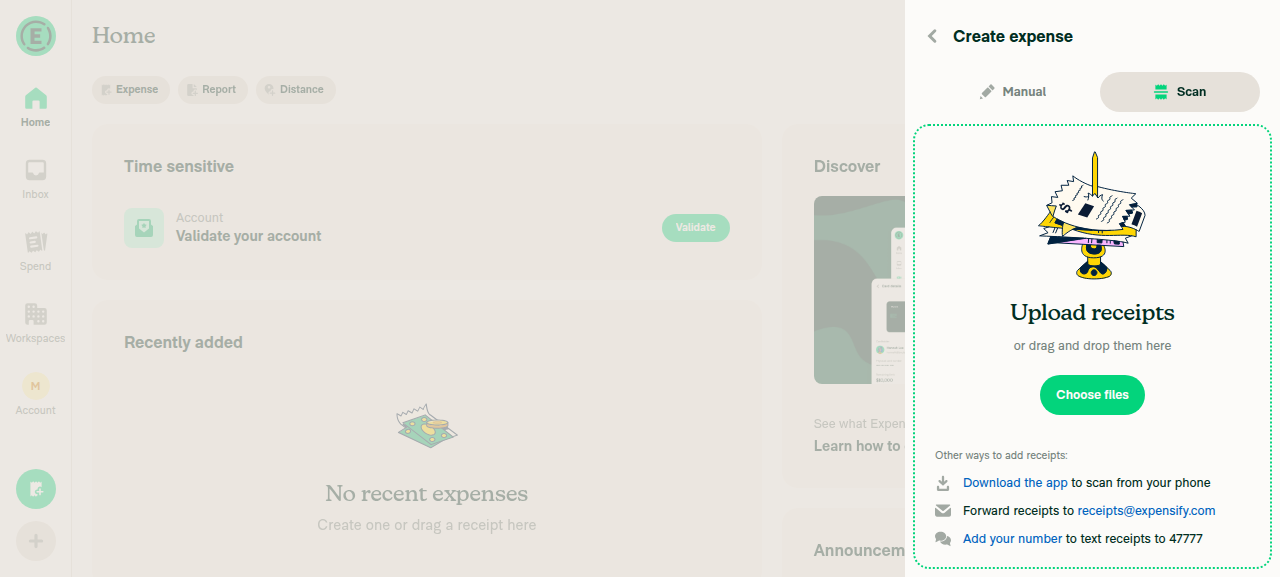
Testing note: this fix is iOS-native (the whole point is the rotating iOS data container), so it can't be exercised on web — it needs iOS native QA: capture/queue a receipt offline, upgrade/relaunch so the container UUID rotates, then confirm the queued expense uploads with the receipt instead of a $0 no-receipt expense. As a web regression check I did confirm the Create expense → Scan/upload screen (which now goes through the modified shared resolve path in useScanFileReadabilityCheck / ReceiptFileValidator) still renders correctly with no console errors:

Create expense Scan tab renders correctly on web

Create expense Scan tab renders correctly on web

Also note the PR's Tests and QA Steps sections are still the template placeholders — they'll need real steps (or [No QA]) before merge.

adhorodyski and others added 10 commits August 5, 2026 13:18
…ay read

RNFS.moveFile falls back to copy-then-delete when the rename crosses
filesystems, which react-native-blob-util's mv does not — on Android the
receipts folder sits on external storage while picked and cropped files
sit in the app cache, so the move there is cross-device.

Gallery pick and crop/rotate now fall back to the original file when
adopt fails, matching main, instead of silently losing the image. Camera
capture keeps the loud failure since the user can retake.

Receipt previews re-root the stored path at read through
getThumbnailAndImageURIs, so a receipt queued before an upgrade renders
correctly, not just uploads correctly.

Co-Authored-By: Claude Fable 5 <noreply@anthropic.com>
# Conflicts:
#	src/pages/media/AttachmentModalScreen/routes/TransactionReceiptModalContent.tsx
The resolve() call sites, the second copy of the vision-camera note, and
the catch blocks whose Log.alert already says "using original URI" all
carried comments that repeat what the line below them does. The type and
module docblocks were essay-length for a three-method module.

What stays is what you cannot read off the code: why RNFS.moveFile
rather than blob-util's mv, why adopt has a no-move branch, why
cleanFileName matters here, and what a numeric receipt source means.

The module docblock was a floating /** */ that JSDoc would bind to
verify(), and it quoted react-native-blob-util docs for a file that no
longer imports it.

Co-Authored-By: Claude Fable 5 <noreply@anthropic.com>
resolve() took `unknown`, so a caller could pass the wrong field and get
undefined with no type error. Every call site already passes
receipt.source, so ReceiptSource | undefined typechecks with no casts.

prepareRequestPayload now builds the FormData uri from resolve(source)
rather than the receipt's own uri field, and no test covered that. A
revert to the old field passes every other test in the file and uploads
the stale path. The assertion runs through validateFormDataParameter
because the FormData polyfill stringifies the entry.

Co-Authored-By: Claude Fable 5 <noreply@anthropic.com>
The receipt sets uri to the stale path two lines above the assertion
that expects the current one.

Co-Authored-By: Claude Fable 5 <noreply@anthropic.com>
resolve() sat at three call sites, so every reader of a stored receipt
path had to remember to call it. useRestartOnOdometerImagesFailure did
not, and it deletes a good odometer draft when the check fails.

The three hooks and validators all reach the filesystem through
checkIfLocalFileIsAccessible or validateReceiptFile, so resolving there
covers them, covers the odometer hook without touching it, and covers
the next caller nobody remembers to patch.
navigateToStartStepIfScanFileCannotBeRead reads the same field through
readFileAsync and gets the same treatment.

Co-Authored-By: Claude Opus 5 (1M context) <noreply@anthropic.com>
getTransactionWithPreservedLocalReceiptSource copies receipt.source into
receipt.localSource for a queued scan expense, and ReportActionItemImage
prefers localSource for both the thumbnail and the full image. That read
bypassed getThumbnailAndImageURIs, so the preview of a queued expense
still pointed at the container the upgrade left behind while the upload
itself recovered.

resolve() now takes null so localSource passes straight in.

Co-Authored-By: Claude Opus 5 (1M context) <noreply@anthropic.com>
adopt asked whether a file was already in the folder with
startsWith(dir), while toDurableName asks by folder name because RNFS
and blob-util disagree about the container prefix (/private/var and
/var). adopt is exposed to exactly that disagreement: dir comes from
blob-util and the camera path comes from vision-camera.

Using the one matcher also lets a stale stored path verify in place
instead of moving a file from a directory the device no longer has.

Co-Authored-By: Claude Opus 5 (1M context) <noreply@anthropic.com>
A bundled placeholder is a require() asset id, which is a number on
native. validateReceiptFile already checks for exactly that with
typeof. The regex was here because the global File type declares
source as string, so widening the cast to Receipt['source'] lets the
typed guard compile and drops the String() around the resolved uri.

The fixture used '686' as a string, which native never produces.

Co-Authored-By: Claude Opus 5 (1M context) <noreply@anthropic.com>
Four of these repeated the call right under them: resolve() already
names what it does. What survives is the part a reader cannot get from
the code — vision-camera writing into the folder itself, and a
require() asset id being a number. The stale-container reasoning lives
on toDurableName, which is the function that acts on it.

Co-Authored-By: Claude Opus 5 (1M context) <noreply@anthropic.com>
@mountiny
mountiny requested a review from ZhenjaHorbach August 6, 2026 13:34
@adhorodyski
adhorodyski marked this pull request as ready for review August 6, 2026 14:07
@adhorodyski
adhorodyski requested review from a team as code owners August 6, 2026 14:07
@melvin-bot
melvin-bot Bot requested review from flaviadefaria, ikevin127 and mountiny and removed request for a team and flaviadefaria August 6, 2026 14:07
@melvin-bot

melvin-bot Bot commented Aug 6, 2026

Copy link
Copy Markdown

@ikevin127 @mountiny One of you needs to copy/paste the Reviewer Checklist from here into a new comment on this PR and complete it. If you have the K2 extension, you can simply click: [this button]

@melvin-bot
melvin-bot Bot removed the request for review from a team August 6, 2026 14:07

@chatgpt-codex-connector chatgpt-codex-connector Bot left a comment

Copy link
Copy Markdown

Choose a reason for hiding this comment

The reason will be displayed to describe this comment to others. Learn more.

💡 Codex Review

Here are some automated review suggestions for this pull request.

Reviewed commit: a16afb32e1

ℹ️ About Codex in GitHub

Codex has been enabled to automatically review pull requests in this repo. Reviews are triggered when you

  • Open a pull request for review
  • Mark a draft as ready
  • Comment "@codex review".

If Codex has suggestions, it will comment; otherwise it will react with 👍.

When you sign up for Codex through ChatGPT, Codex can also answer questions or update the PR, like "@codex address that feedback".

Comment thread src/libs/ReceiptUtils.ts
@github-actions

github-actions Bot commented Aug 6, 2026

Copy link
Copy Markdown
Contributor

🚧 mountiny has triggered a test Expensify/App build. You can view the workflow run here.


captureReceipt(camera.current, {flash, hasFlash, isPlatformMuted, path, isInLandscapeMode})
.then((photo: PhotoFile) => {
.then((photo: PhotoFile) => ReceiptStorage.adopt(photo.path))

Copy link
Copy Markdown
Contributor

Choose a reason for hiding this comment

The reason will be displayed to describe this comment to others. Learn more.

I suppose now we have a bit different behaviour here
Adopt() rejects, while the old moveReceiptToDurableStorage fell back to the original URI. Here, a rejection lands in the .catch below and shows the camera error alert, so the photo is lost
Should this get a .catch falling back to photo.path?

Copy link
Copy Markdown
Contributor Author

Choose a reason for hiding this comment

The reason will be displayed to describe this comment to others. Learn more.

adopt runs no move here: vision-camera already wrote into the receipts folder, so a rejection means photo.path names a file that is gone.

cropImageToAspectRatio(imageObject, viewfinderLayout.current?.width, viewfinderLayout.current?.height, undefined, photo.orientation)
.then(({file, filename, source}) => moveReceiptToDurableStorage(source, filename).then((durableSource) => ({file, filename, source: durableSource})))
.then(({file, filename, source}) =>
ReceiptStorage.adopt(source, filename).then((durableName) => ({file, filename, source: ReceiptStorage.toLocalUri(durableName)})),

Copy link
Copy Markdown
Contributor

Choose a reason for hiding this comment

The reason will be displayed to describe this comment to others. Learn more.

And here

Copy link
Copy Markdown
Contributor Author

Choose a reason for hiding this comment

The reason will be displayed to describe this comment to others. Learn more.

The user stands at the camera here, so the alert lets them retake; gallery pick and crop/rotate cannot retake, and both already fall back.

An iOS receipt captured on an earlier build is stored without a file://
scheme, because getPhotoSource returns the bare path there. resolve() sat
inside the branch that only a blob: or file: string can reach, so those
receipts fell through to the remote branch and the preview kept pointing
at the container the upgrade left behind, while the upload recovered.

Resolving where path is computed covers every reader of
getThumbnailAndImageURIs and leaves the branch condition alone, so a
cache path that never belonged to the receipts folder is treated as it
was before.

Co-Authored-By: Claude Opus 5 (1M context) <noreply@anthropic.com>
@ZhenjaHorbach

ZhenjaHorbach commented Aug 6, 2026

Copy link
Copy Markdown
Contributor

Reviewer Checklist

  • I have verified the author checklist is complete (all boxes are checked off).
  • I verified the correct issue is linked in the ### Fixed Issues section above
  • I verified testing steps are clear and they cover the changes made in this PR
    • I verified the steps for local testing are in the Tests section
    • I verified the steps for Staging and/or Production testing are in the QA steps section
    • I verified the steps cover any possible failure scenarios (i.e. verify an input displays the correct error message if the entered data is not correct)
    • I turned off my network connection and tested it while offline to ensure it matches the expected behavior (i.e. verify the default avatar icon is displayed if app is offline)
  • I checked that screenshots or videos are included for tests on all platforms
  • I included screenshots or videos for tests on all platforms
  • I verified that the composer does not automatically focus or open the keyboard on mobile unless explicitly intended. This includes checking that returning the app from the background does not unexpectedly open the keyboard.
  • I verified tests pass on all platforms & I tested again on:
    • Android: HybridApp
    • Android: mWeb Chrome
    • iOS: HybridApp
    • iOS: mWeb Safari
    • MacOS: Chrome / Safari
  • If there are any errors in the console that are unrelated to this PR, I either fixed them (preferred) or linked to where I reported them in Slack
  • I verified proper code patterns were followed (see Reviewing the code)
    • I verified that comments were added to code that is not self explanatory
    • I verified that any new or modified comments were clear, correct English, and explained "why" the code was doing something instead of only explaining "what" the code was doing.
    • I verified any copy / text that was added to the app is grammatically correct in English. It adheres to proper capitalization guidelines (note: only the first word of header/labels should be capitalized), and is either coming verbatim from figma or has been approved by marketing (in order to get marketing approval, ask the Bug Zero team member to add the Waiting for copy label to the issue)
  • If a new code pattern is added I verified it was agreed to be used by multiple Expensify engineers
  • I verified that this PR follows the guidelines as stated in the Review Guidelines
  • I verified other components that can be impacted by these changes have been tested, and I retested again (i.e. if the PR modifies a shared library or component like Avatar, I verified the components using Avatar have been tested & I retested again)
  • If a new component is created I verified that:
    • A similar component doesn't exist in the codebase
    • All props are defined accurately
    • The component has a clear name that is non-ambiguous and the purpose of the component can be inferred from the name alone
    • The only data being stored in the state is data necessary for rendering and nothing else
    • The component has the minimum amount of code necessary for its purpose, and it is broken down into smaller components in order to separate concerns and functions
  • If a new CSS style is added I verified that:
    • A similar style doesn't already exist
    • The style can't be created with an existing StyleUtils function (i.e. StyleUtils.getBackgroundAndBorderStyle(theme.componentBG)
  • If the PR modifies code that runs when editing or sending messages, I tested and verified there is no unexpected behavior for all supported markdown - URLs, single line code, code blocks, quotes, headings, bold, strikethrough, and italic.
  • If the PR modifies a generic component, I tested and verified that those changes do not break usages of that component in the rest of the App (i.e. if a shared library or component like Avatar is modified, I verified that Avatar is working as expected in all cases)
  • If the PR modifies a component related to any of the existing Storybook stories, I tested and verified all stories for that component are still working as expected.
  • If the PR modifies a component or page that can be accessed by a direct deeplink, I verified that the code functions as expected when the deeplink is used - from a logged in and logged out account.
  • If the PR modifies the UI (e.g. new buttons, new UI components, changing the padding/spacing/sizing, moving components, etc) or modifies the form input styles:
    • I verified that all the inputs inside a form are aligned with each other.
    • I added Design label and/or tagged @Expensify/design so the design team can review the changes.
  • For any bug fix or new feature in this PR, I verified that sufficient unit tests are included to prevent regressions in this flow.
  • If the main branch was merged into this PR after a review, I tested again and verified the outcome was still expected according to the Test steps.
  • I have checked off every checkbox in the PR reviewer checklist, including those that don't apply to this PR.

Screenshots/Videos

Android: HybridApp
Android: mWeb Chrome
iOS: HybridApp
iOS: mWeb Safari
MacOS: Chrome / Safari

Sign up for free to join this conversation on GitHub. Already have an account? Sign in to comment

Labels

None yet

Projects

None yet

Development

Successfully merging this pull request may close these issues.

4 participants